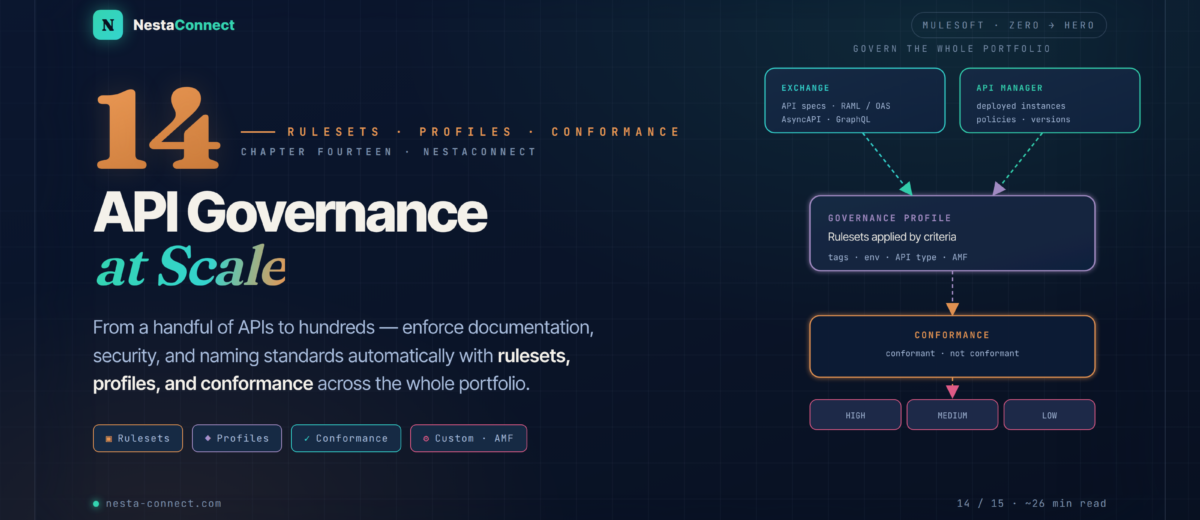
A handful of APIs you can eyeball. Hundreds you cannot. API Governance is how you enforce — automatically — that every API in the portfolio is documented, secure, and follows your standards, and how you prove it to an auditor.
Across this series you’ve built APIs, deployed them, secured them, and — in Chapter 13 — made them observable. But as a portfolio grows from a few APIs to a few hundred, a new problem appears: consistency. Does every API use HTTPS? Does each one carry descriptions and examples? Do payment APIs all enforce OAuth? Checking by hand doesn’t scale. Anypoint API Governance turns those standards into rules the platform enforces continuously.
The companion repo carries a governance starter kit: a cloned-and-customized ruleset, a from-scratch AMF rule, the validate → document → publish CLI sequence, an auto-discovery snippet, and the PCI profile criteria from the case study.
→ github.com/nestaconnect/mulesoft-from-zero-to-heroBy the end of this chapter you will:
- Read the governance dashboard — conformance status, severity, and risk
- Know the MuleSoft-provided rulesets and when to reach for each
- Create governance profiles with selection criteria (tags, environment, API type)
- Author custom rulesets — by cloning an existing one or building from scratch with AMF
- Validate, document, and publish rulesets to Exchange with the Anypoint CLI
- Tie it together by enforcing PCI compliance across 50+ APIs
01 · The Model — How Governance Works
API Governance is the practice of defining standards once and having the platform apply them everywhere. The moving parts are simple: your API specs live in Exchange and your API instances live in API Manager; a governance profile binds a set of rulesets to a slice of that portfolio; and the platform reports conformance — continuously — back on the dashboard.
02 · The Dashboard — Metrics, Conformance & Severity
The governance dashboard is the portfolio at a glance. A few metrics matter most:
- Unprotected APIs — not managed in API Manager, so no policies and no governance. These are your risk surface.
- Governed APIs — the count covered by an active profile.
- APIs in Exchange / in Production — specs in the catalog versus instances actually deployed.
- Conformance status — each governed API is Conformant or Not Conformant against its profile’s rulesets.
- Nonconformance by severity — issues bucketed High / Medium / Low so you fix what matters first.
There’s a newer governance model you can opt into: govern by API version rather than by asset version. It evaluates all instances across all versions of an API and surfaces richer reports in both API Governance and API Manager. The opt-in applies org-wide, so enable it deliberately — but for most teams it’s the clearer mental model.
03 · Rulesets — The AMF Building Blocks
A ruleset is a collection of validation rules that run against API specs and instances. Rulesets are built on AMF (the API Modeling Framework), the open-source engine Anypoint uses to parse and validate RAML, OAS, AsyncAPI, GraphQL, and gRPC. MuleSoft ships a catalog of rulesets out of the box — discover them in Exchange by filtering on the Rulesets asset type.
| Ruleset | What it enforces |
|---|---|
| Anypoint API Best Practices | Baseline quality rules across spec types |
| OpenAPI Best Practices | ~12 best practices for OAS 3.0.x (OAS 2.0 compatible) |
| AsyncAPI Best Practices | ~21 best practices for AsyncAPI 2.0.0 |
| Authentication Security Best Practices | ~14 security rules for API authentication |
| HTTPS Enforcement | Requires APIs to be served over HTTPS |
| Required Examples | Ensures payloads carry examples |
| API Catalog Information Best Practices | Metadata, descriptions, catalog completeness |
| Mule API Management Best Practices | Instance-level policy & management rules |
Partner- and example-provided rulesets also appear in Exchange. Start from these — they encode hard-won industry practice — and only write custom rules for what they don’t cover.
04 · Profiles — Targeting APIs at Scale
A governance profile binds one or more rulesets to a slice of the portfolio defined by selection criteria — so you don’t apply rules one API at a time. Criteria include API type (REST, HTTP, AsyncAPI…), tags & categories (e.g. PCI, public, critical), environment (Production, Sandbox), and business group. Tag a new API correctly and it inherits the right governance automatically.
You can build profiles in the console or with the CLI. The CLI is the path to repeatable, version-controlled governance:
# bind a ruleset GAV to every production REST API tagged "pci"
anypoint-cli-v4 governance profile create "PCI-DSS" \
  YOUR_ORG_ID/pci-compliance-rules/latest \
  --criteria "tag:pci,category:API Type:Experience API,status:production,scope:rest-api,env-type:production" \
--description "Governs all production PCI APIs"Create a profile as a Draft first. A draft evaluates conformance privately — you can see what would fail without publishing that status across the platform or alarming API owners. Once the results look right, flip it to Active. Using latest as the ruleset version makes the profile auto-adopt new ruleset versions as you publish them.
05 · Conformance — Reports & Remediation
Once a profile is Active, every matching API is evaluated and its status shows up in three places: the dashboard (summary), API Manager (instance conformance), and Exchange (spec conformance). When something fails, you can read the details in the UI or export a CSV report that names each failed rule and why. Where you fix it depends on where the problem lives:
| Failing rule (example) | Origin | Where to fix |
|---|---|---|
| Policies should be configured in a specific order | Instance | API Manager — reorder the instance’s policies |
| API instance has no required policy applied | Instance | API Manager — apply the policy to the instance |
| All instance server URLs must be described in the spec | Specification | Design Center — edit the RAML/OAS, commit |
The split is the key idea: specification problems are fixed in Design Center and committed; instance problems are fixed in API Manager. Conformance re-evaluates after the change.
06 · Custom Rulesets — Clone or Build
When the provided rulesets don’t cover your organization’s standards, write your own. Two approaches, both driven by the Anypoint CLI (its install includes the API Governance plugin): clone and modify an existing ruleset — recommended — or scaffold from scratch with governance ruleset init.
# 1 · capture the rules you start from (--remote pulls the Exchange asset)
anypoint-cli-v4 governance ruleset info \
  68ef9520-24e9-4cf2-b2f5-620025690913/anypoint-best-practices/1.0.2 \
  --remote > before-rules.txt

# 2 · clone it, downgrading two rules to warnings (also --error / --info / --remove)
anypoint-cli-v4 governance ruleset clone ~/rulesets/base.yaml \
  'PCI Compliance Rules' 'Cloned from Anypoint Best Practices' \
  --warning=operation-default-response,operation-operationId > pci-rules.yaml

# 3 · list the new rules and diff against the before list
anypoint-cli-v4 governance ruleset info ~/rulesets/pci-rules.yaml > after-rules.txt
A from-scratch rule is an AMF validation definition: it targets a node in the API model (an endpoint, an operation, the API root) and asserts constraints on it. Here’s the shape of a rule requiring every API to be HTTPS-only:
https-only:
  message: "All APIs must be served over HTTPS"
  targetClass: apiContract.WebAPI
  propertyConstraints:
    apiContract.scheme:
      in: ["https"]
minCount: 1The AMF rule vocabulary (targetClass, propertyConstraints, the apiContract.* classes) is intricate and version-sensitive — don’t hand-write it blind. Scaffold with governance ruleset init (or the open-source ruleset-development-cli), and treat the example above as a shape, not gospel. For help, the AMF custom-validator project is the place to file issues — custom rulesets are not covered by standard MuleSoft support.
07 · Ship It — Validate, Document, Publish
A custom ruleset isn’t usable until it’s in Exchange. The flow is always the same three CLI steps — validate the syntax, generate documentation, then upload both as a ruleset asset:
# 1 · validate (runs locally, no platform call)
anypoint-cli-v4 governance:ruleset:validate ~/rulesets/pci-rules.yaml

# 2 · generate the documentation zip
anypoint-cli-v4 governance:document ~/rulesets/pci-rules.yaml ~/rulesets/pci.doc.zip

# 3 · upload both as a ruleset asset (GAV = org/asset-id/version)
anypoint-cli-v4 exchange asset upload YOUR_ORG_ID/pci-compliance-rules/1.0.0 \
  --name "PCI Compliance Rules" \
  --description "Enforces PCI-DSS standards across payment APIs" \
  --type ruleset \
  --files='{"ruleset.yaml":"~/rulesets/pci-rules.yaml","docs.zip":"~/rulesets/pci.doc.zip"}'
Republishing a duplicate fails with a 409 — bump the version (1.0.0 → 1.0.1) or change the asset ID. Find YOUR_ORG_ID in Access Management → your organization.
08 · Auto-Discovery — Wiring Runtime to Governance
Governance can only see an instance that API Manager knows about. API Auto-Discovery is the link: it registers your deployed Mule app against its API Manager instance so policies, analytics, and conformance all attach to it. Grab the instance’s Autodiscovery ID from API Manager and reference it in the app:
<!-- apiId comes from API Manager; inject per environment, never hardcode -->
<api-gateway:autodiscovery
    apiId="${api.id}" flowRef="api-main"/>
Deploy to CloudHub 2.0 and the runtime syncs with API Manager automatically. From that moment the API is observable, policy-driven, and governable — an unprotected API becomes a governed one.
09 · Case Study — PCI Compliance Across 50+ APIs
A financial-services company must ensure every API touching payment data meets PCI DSS: HTTPS only, OAuth 2.0 on every endpoint, rate limiting and Client ID enforcement, no cardholder data in examples or logs. Fifty-plus APIs, growing weekly. Hand-auditing is hopeless — governance makes it automatic.
The custom ruleset combines a clone of the Authentication Security Best Practices ruleset with a handful of bespoke rules — including one that requires OAuth 2.0 on every endpoint:
oauth2-required:
  message: "All endpoints must be secured with OAuth 2.0"
  targetClass: apiContract.EndPoint
  propertyConstraints:
    apiContract.security:
      minCount: 1
      apiContract.securityScheme:
        core.name:
          pattern: "OAuth 2.0"
The build, in five moves: tag every PCI API in Exchange; clone Authentication Security Best Practices and add the bespoke rules; validate, document, publish the ruleset; create a PCI-DSS profile with criteria tag:pci + env-type:production; set it Active and watch the dashboard.
The win isn’t the first 50 APIs — it’s the 51st. Because the profile selects by tag, any new API tagged pci is governed the moment it’s published; nobody has to remember to add it. Non-conformant APIs surface on the dashboard with links straight to the fix, and the CSV export is the artifact your PCI auditor actually wants.
10 · Recap — What You Now Know
Define once, enforce everywhere
Specs in Exchange + instances in API Manager, evaluated by a profile of rulesets, reported as conformance.
- One place to set standards
- Continuous evaluation
- Surfaced in 3 consoles
- Graded by severity
Read the risk
Unprotected vs governed APIs, conformance status, and High/Med/Low severity — fix the High issues first.
- Unprotected = risk surface
- Conformant / not
- Severity buckets
- Opt in to govern-by-version
Start with the catalog
AMF-based rulesets ship for OAS, AsyncAPI, auth, HTTPS, examples and more — reach for these before writing your own.
- Built on AMF
- Filter Exchange by Rulesets
- Cover most needs
- Industry best practice
Target by criteria
Bind rulesets to APIs by tag, environment, and type. Draft first, then Active. New tagged APIs inherit it.
- tags · env · API type
- Draft → Active
latestauto-adopts versions- Auto-inheritance by tag
Clone, validate, publish
Clone an existing ruleset or scaffold with init; validate → document → publish to Exchange via the CLI.
- Clone > hand-write
- AMF rule vocabulary
- Not MuleSoft-supported
- Bump version to republish
Tag once, governed forever
One tagged profile governs 50+ payment APIs — and every new one — with a CSV export the auditor can read.
- Auto-discovery wires it in
- Tag-based selection
- Continuous conformance
- Audit-ready reports
The companion repo carries the governance starter kit from this chapter: the cloned PCI ruleset, the from-scratch AMF rule, the validate/document/publish CLI sequence, the profile criteria, and the auto-discovery snippet — ready to adapt to your org.
→ github.com/nestaconnect/mulesoft-from-zero-to-hero