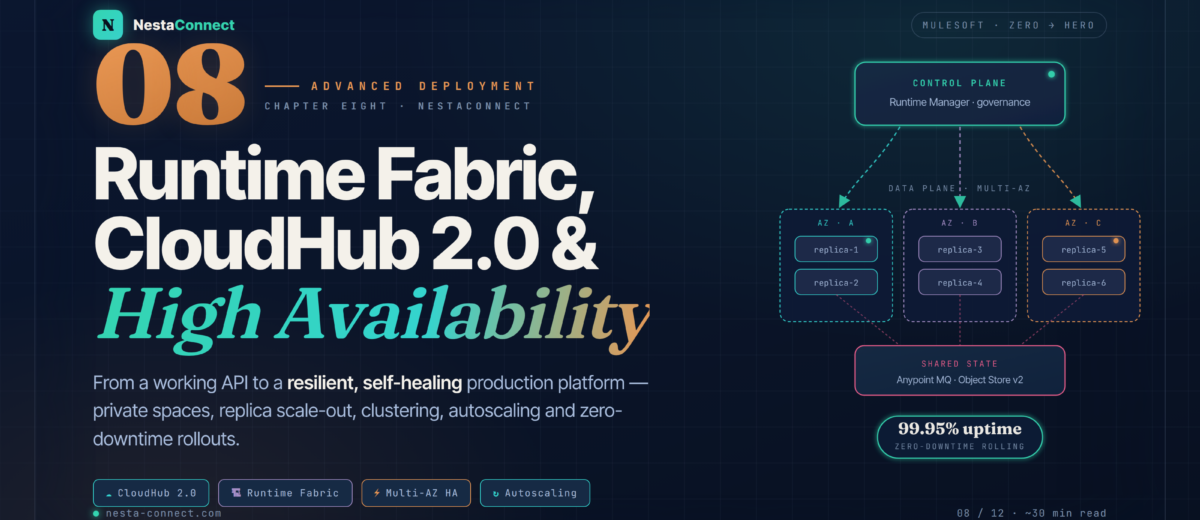
From a working API to a resilient, self-healing production platform — CloudHub 2.0 private spaces, Runtime Fabric on your own Kubernetes, multi-AZ availability, clustering, autoscaling, and zero-downtime rollouts that survive a data-center outage.
In Chapter 7 you took a working Customer API and turned it into a governed asset — policies, SLA tiers, Flex Gateway, and a CI/CD pipeline. But governance is only half of production. The other half is resilience: what happens when an availability zone drops, when traffic triples on Black Friday, or when you have to ship a breaking change to a live API serving millions of requests. This chapter is your complete tour of the runtime side of MuleSoft — where your apps actually run, and how to keep them running.
The companion repo carries a complete deployment scaffold for this chapter — a pom.xml with the cloudHub2Deployment config, a clustering-enabled deployment example, a Runtime Fabric values.yaml, an Anypoint MQ reliability pattern, and the full multi-region disaster-recovery topology used in the case study.
By the end of this chapter you will:
- Compare CloudHub 1.0, CloudHub 2.0, and Runtime Fabric — and pick the right one with confidence
- Understand CloudHub 2.0 architecture: private spaces, replicas, vCore sizing, and intelligent healing
- Run Mule on your own Kubernetes with Runtime Fabric — controllers, workers, and the agent
- Design for high availability across availability zones — and know HA from clustering
- Scale horizontally with replica scale-out and Horizontal Pod Autoscaling
- Handle state and messaging correctly — why persistent VM queues are gone on CloudHub 2.0
- Ship zero-downtime updates with rolling, blue-green, and canary strategies
- Plan disaster recovery and a multi-region topology — and understand what MuleSoft does not give you out of the box
- Monitor and alert on the metrics that actually predict incidents
01 · The Landscape — Where Can a Mule App Actually Run?
MuleSoft’s deployment options sit on a spectrum that trades convenience against control. At one end, you hand everything to MuleSoft and never think about infrastructure. At the other, you run Mule on your own Kubernetes cluster and own every layer. The art is knowing which trade-off your project actually needs — most teams over-estimate how much control they require.
| Platform | Runs on | You manage | Best for |
|---|---|---|---|
| CloudHub 1.0 | Multi-tenant VMs (workers) | Almost nothing | Legacy only — plan your migration |
| CloudHub 2.0 | MuleSoft-managed Kubernetes | Just your app + private space config | The default for most enterprise workloads |
| Runtime Fabric | Your EKS / AKS / GKE / OpenShift | The Kubernetes cluster | Data sovereignty, hybrid cloud, existing K8s |
| Hybrid / on-prem | Your own servers + Mule agent | Everything | Air-gapped, legacy proximity, sunset paths |
Both CloudHub 2.0 and Runtime Fabric are Kubernetes-based. That means the same mental model — pods, replicas, horizontal scaling, rolling updates — applies whether MuleSoft runs the cluster or you do. Learn the concepts once on CloudHub 2.0, and they transfer directly to Runtime Fabric. CloudHub 2.0 architecture →
02 · CloudHub 2.0 — The Managed Runtime, Up Close
CloudHub 2.0 gives you a fully managed, containerized runtime. Each environment runs inside a private space — a virtual, private, isolated logical space in which your Mule apps run, with its own IP ranges, VPC connectivity, and firewall rules. Inside a private space you deploy applications, and each application runs as one or more replicas — dedicated instances of the Mule runtime engine, each in its own container.
2.1 · Replicas and vCore sizing
You scale a replica vertically by choosing a vCore size, and horizontally by adding more replicas. Bigger vCore sizes give more CPU, heap, and ephemeral storage. Replicas below 1.0 vCore are burstable (they can briefly borrow CPU when available); replicas at 1.0 vCore and above give consistent performance.
| vCore size | vCPU | Heap | Total memory | Storage |
|---|---|---|---|---|
| 0.1 | 0.1 (burstable) | ~0.6 GB | 1.2 GB | 8 GB |
| 0.2 | 0.2 (burstable) | 1 GB | 2 GB | 8 GB |
| 0.5 | 0.5 (burstable) | 1.3 GB | 2.6 GB | 10 GB |
| 1.0 | 1 (consistent) | 2 GB | 4 GB | 12 GB |
| 2.0 | 2 (consistent) | 4 GB | 8 GB | 40 GB |
| 4.0 | 4 (consistent) | 7.5 GB | 15 GB | 88 GB |
Unlike CloudHub 1.0’s jump from 0.2 to 1.0, CloudHub 2.0 offers granular increments — 0.5, 1.0, 1.5, 2.0, 2.5, 3.0, 3.5, and 4.0 vCores per replica — so you size to the workload instead of over-paying. The metaspace limit is fixed at 256 MB regardless of replica size. Note: stopped applications don’t count toward your vCore usage, but deployed-and-running ones do. Replica sizing →
2.2 · Deploying to CloudHub 2.0 with Maven
You can deploy from Anypoint Studio, from Runtime Manager, or — the only sane choice for production — from a pipeline using the Mule Maven Plugin. Always pin an LTS runtime (Mule 4.6 LTS or later) and set a rolling update strategy for zero downtime.
<plugin>
  <groupId>org.mule.tools.maven</groupId>
  <artifactId>mule-maven-plugin</artifactId>
  <version>4.2.0</version>
  <extensions>true</extensions>
  <configuration>
    <cloudHub2Deployment>
      <uri>https://anypoint.mulesoft.com</uri>
      <environment>Production</environment>
      <target>private-space-eu-west-1</target>
      <muleVersion>4.6.14</muleVersion>          <!-- LTS -->
      <applicationName>order-api-prod</applicationName>
      <replicas>2</replicas>                         <!-- HA across AZs -->
      <vCores>0.5</vCores>
      <deploymentSettings>
        <updateStrategy>rolling</updateStrategy>   <!-- zero downtime -->
        <clustered>false</clustered>            <!-- HA, not clustering -->
      </deploymentSettings>
      <properties>
        <mule.env>production</mule.env>
      </properties>
      <secureProperties>
        <db.password>${DB_PASSWORD}</db.password>  <!-- encrypted at rest -->
      </secureProperties>
    </cloudHub2Deployment>
  </configuration>
</plugin>
03 · Runtime Fabric — Your Kubernetes, MuleSoft’s Management
Runtime Fabric (RTF) lets you run Mule applications and API gateways on your own Kubernetes, while Anypoint Platform stays the control plane. Your data never leaves your infrastructure — the perfect fit for data-residency requirements, hybrid cloud, or teams who already live in Kubernetes. RTF comes in two flavours:
- RTF on Self-Managed Kubernetes — you install the RTF agent into an existing cluster: Amazon EKS, Azure AKS, Google GKE, Red Hat OpenShift, or Rancher (RKE). You own the cluster lifecycle.
- RTF on VMs / Bare Metal — MuleSoft ships the full appliance (Docker + Kubernetes packaged together) and you install it on VMs you operate. MuleSoft maintains the appliance components.
Runtime Fabric has no native Object Store — for state shared across replicas you use the Persistence Gateway, which backs Object Store with a PostgreSQL database you provide. Apps must exist in Exchange before they can be deployed to RTF, so your CI/CD differs from CloudHub. You provide and operate the ingress controller, DNS, and load balancers yourself. Runtime Fabric overview →
04 · High Availability — Surviving a Zone Outage
High availability means your application keeps serving even when something fails. On CloudHub 2.0 and Runtime Fabric, HA comes from redundancy. The single most important fact: when you deploy with two or more replicas, the platform automatically distributes them across two or more availability zones. If one zone has an outage, the replicas in the other keep handling traffic — and you didn’t configure anything special to get it.
But there’s a subtle, frequently-misunderstood distinction between plain HA and clustering, and choosing wrong causes real bugs (double-fired schedulers, lost object-store data).
4.1 · Replica scale-out limits
You can deploy an application with up to 8 replicas — or up to 16 replicas if your organization has the Anypoint Integration Advanced package or a Platinum/Titanium subscription. Mule automatically distributes those replicas across two or more data centers for maximum reliability. When you enable clustering, MuleSoft recommends scaling a cluster to no more than 8 nodes.
Batch jobs run on a single replica at a time and cannot be distributed across replicas. If the running app is updated mid-batch, the remaining batch work does not continue. For durable batch state on CloudHub 2.0, externalize to Object Store v2. Schedulers in a non-clustered multi-replica app fire on every replica — either enable clustering or make the flow idempotent. Clustering docs →
05 · Scaling — Manual, Automatic, and the Catches
Scaling on CloudHub 2.0 happens two ways. Manual scaling: in Runtime Manager you adjust replica count and vCore size at any time — new replicas are provisioned on scale-up, and traffic is drained before termination on scale-down. Autoscaling: under the hood, Kubernetes uses a Horizontal Pod Autoscaler (HPA) that adds or removes replicas to match demand, so an application can move to a new replica without any user action.
Before you crank the replica count, internalize the four things that bite teams in production:
| Consideration | Why it matters | What to do |
|---|---|---|
| Stateless vs stateful | Stateless apps scale linearly; stateful apps need shared state | Externalize state to Anypoint MQ or Object Store v2 |
| Connection pools | Each replica opens its own pool to the backend | 10 replicas × 20 conns = 200 — size the DB for the total |
| Schedulers & batch | Fire on every replica (non-clustered); batch is single-replica | Cluster, or make flows idempotent |
| vCore licensing | Org-level vCore cap enforced across CloudHub + CloudHub 2.0 | You can deploy but not start apps if you’re over the cap |
06 · State & Messaging — Why Persistent VM Queues Are Gone
This is the section that trips up engineers migrating from CloudHub 1.0, so read it twice. CloudHub 2.0 does not support persistent VM queues. The in-memory VM connector still works for transient, intra-app communication, but if you relied on persistent VM queues for reliable, restart-surviving messaging, you must refactor to a real message broker.
Persistent VM queues are not available on CloudHub 2.0. To get reliable, persistent messaging, move to an external broker: Anypoint MQ, JMS (ActiveMQ/IBM MQ), Apache Kafka, or RabbitMQ. As soon as a message lands in the broker, a subscriber in your app processes it — no in-flight data is lost across restarts or redeploys. If a scheduler triggers the flow, enable clustering so only the primary fires it. Transition guide →
For shared application state (not messages), CloudHub 2.0 uses Anypoint Object Store v2 (OSv2) — a managed store for things like idempotency keys, OAuth tokens, and watermark values. Two facts you must design around:
- OSv2 is regional. It runs in the same region as your app and provides no cross-region failover. An app in another region cannot read it.
- Object stores are not shared between non-clustered replicas. Write to one replica and the others won’t see it — unless you use the cloud object store (OSv2) or enable clustering.
On Runtime Fabric, the equivalent is the Persistence Gateway, which persists Object Store data to a PostgreSQL database so state survives restarts and is shared across replicas.
<!-- Publish reliably to a durable broker queue -->
<flow name="order-intake">
  <http:listener config-ref="https-listener" path="/orders"/>
  <anypoint-mq:publish config-ref="amq-config" destination="orders-queue"/>
  <ee:transform> <!-- 202 Accepted --> </ee:transform>
</flow>

<!-- A subscriber processes independently; survives restarts & redeploys -->
<flow name="order-processor">
  <anypoint-mq:subscriber config-ref="amq-config" destination="orders-queue"/>
  <flow-ref name="persist-order"/>
</flow>
07 · Zero-Downtime — Shipping Without Interruptions
CloudHub 2.0 supports updating applications at runtime so users of your HTTP APIs experience zero downtime. You choose a deployment model: Rolling update keeps the old version serving while the new one deploys, then cuts over — the production default. Recreate stops the old version first (faster, but a brief outage) — only for non-critical apps.
For changes that need careful validation, two classic patterns layer on top — implemented at the gateway/router level, not inside your app.
08 · Disaster Recovery — The Multi-Region Truth
Here’s the honest version that most tutorials skip: CloudHub 2.0 does not provide multi-region HA or disaster recovery out of the box. Availability is provided within a single region — replicas spread across availability zones, with a platform SLA of 99.95% for replicas in an active-active configuration in that region. If an entire AWS region fails, every replica, private space, ingress, and Anypoint MQ destination in that region becomes unavailable, and they are not automatically replicated elsewhere.
Cross-region resilience is something you architect. The pattern: deploy the app in two regions, put a global load balancer in front, and replicate the database across regions.
If the US East region fails, it’s not just your replicas — Anypoint Platform services like Access Management and Runtime Manager can be affected too, because parts of the control plane run there. Factor that into your runbook: your DR plan can’t assume the console is reachable during a US-East incident. CloudHub 2.0 HA & DR →
09 · Monitoring — Know Before Your Users Do
Anypoint Monitoring is enabled by default for CloudHub 2.0 and Runtime Fabric applications. It gives you dashboards for throughput, error rates, response-time percentiles, and CPU/memory per replica — plus log search by correlationId and custom business metrics. The trick isn’t collecting data; it’s alerting on the signals that actually predict an incident.
| Alert | Trigger | Threshold | Response |
|---|---|---|---|
| Error spike | 5xx rate above baseline | > 5% over 5 min | Page on-call, check the most recent deploy |
| P95 latency | 95th-percentile response time | > 2s over 10 min | Inspect DB slow queries and upstream APIs |
| Replica memory | Replica heap/total memory | > 80% for 15 min | Larger vCore size or hunt a memory leak |
| Replica restarts | Self-healing restart count | > 2 in 10 min | Crash loop — pull the thread/heap dump |
| Queue backlog | Anypoint MQ in-flight depth | Growing & not draining | Scale out consumers; check downstream |
CloudHub 2.0 lets you run thread dumps and heap dumps on a specific replica to debug performance issues in real time, and the MuleSoft diagnostics agent can analyze them with Einstein to return a plain-English diagnosis — collapsing your Mean Time To Resolve. Always instrument flows with a correlationId so a single request is traceable end-to-end across replicas. Anypoint Monitoring docs →
10 · Case Study — OmniShop — Resilient Orders at Global Scale
Let’s make it concrete. OmniShop, a global online retailer, runs an Order Management API that processes millions of orders a day. It must survive an availability-zone failure, absorb Black-Friday spikes, and ship updates without dropping a single order. Here’s how they assembled it from the building blocks in this chapter — and what they consciously chose not to rely on MuleSoft for.
10.1 · The architecture, decision by decision
| Requirement | Decision | Why |
|---|---|---|
| Survive an AZ failure | 3 replicas, plain HA (no clustering) | Auto-distributed across AZs; the API is stateless |
| No lost orders | Anypoint MQ, not VM queues | Persistent VM queues don’t exist on CloudHub 2.0 |
| No duplicate orders | Idempotency keys in Object Store v2 | Safe retries after a failover |
| Black-Friday spikes | HPA autoscaling on CPU | Adds replicas automatically, drains on scale-down |
| Ship without downtime | Rolling updates + canary via proxy | Old version serves until the new one is healthy |
| Regional outage | Second region + Route 53 + Aurora Global DB | CloudHub 2.0 isn’t multi-region OOTB — built in-house |
Over the year OmniShop sustained 99.95%+ availability within their primary region, rode out two AZ-level disruptions with no customer-visible impact, and shipped 40+ production deployments with zero downtime via rolling updates. The cross-region failover — exercised quarterly in a game-day — kept order loss under a one-second RPO by promoting the Aurora read replica and shifting Route 53 to EU. None of it was magic; all of it was the building blocks in this chapter, assembled deliberately.
11 · Recap — What You Now Know
Managed, containerized runtime
Private spaces, replicas in their own containers, granular vCore sizing, and self-healing. Twelve regions, zero infrastructure to operate.
- Private space = isolated VPC + firewall
- Replicas auto-spread across AZs
- vCore 0.1 → 4.0, granular increments
- Intelligent healing restarts crashes
Mule on your own Kubernetes
Self-managed (EKS/AKS/GKE/OpenShift) or VMs/bare-metal appliance. The agent connects outbound over mTLS; your data never leaves.
- Controllers + workers + RTF agent
- Persistence Gateway → PostgreSQL
- Apps must live in Exchange first
- You own ingress, DNS, the cluster
HA is not clustering
Multi-replica = automatic multi-AZ. HA replicas are independent; clustering shares memory so a scheduler fires once. Choose deliberately.
- Up to 8 replicas (16 with Advanced/Platinum)
- Clusters: ≤ 8 nodes recommended
- Batch runs on a single replica
- Data centers ≥ 60 miles apart
No persistent VM queues
Refactor to Anypoint MQ, Kafka, or JMS for durable messaging. Object Store v2 for shared state — but it’s regional with no failover.
- Persistent VM queues gone on CH 2.0
- OSv2 = regional, no cross-region
- Not shared across non-clustered replicas
- RTF: Persistence Gateway on Postgres
Rolling, blue-green, canary
Rolling updates are the production default. Blue-green gives instant rollback; canary ramps traffic. Both implemented at the router.
- Rolling keeps old version live
- Recreate = brief outage, faster
- Canary via proxy weighted routing
- Pair API Manager with NGINX/Flagger
Single-region SLA, your multi-region
99.95% within a region; multi-region DR is your design. Anypoint Monitoring is on by default — alert on errors, P95, memory, restarts.
- No multi-region HA out of the box
- Global LB + cross-region DB replication
- Thread/heap dumps per replica
- Einstein diagnostics cut MTTR
The companion repo carries the complete deployment scaffold from this chapter — the cloudHub2Deployment pom.xml, a clustering-enabled variant, a Runtime Fabric values.yaml, the Anypoint MQ reliability flow, and the multi-region DR topology with Route 53 and Aurora Global Database. Clone it, set your secrets, and you have a resilient deployment blueprint to adapt.