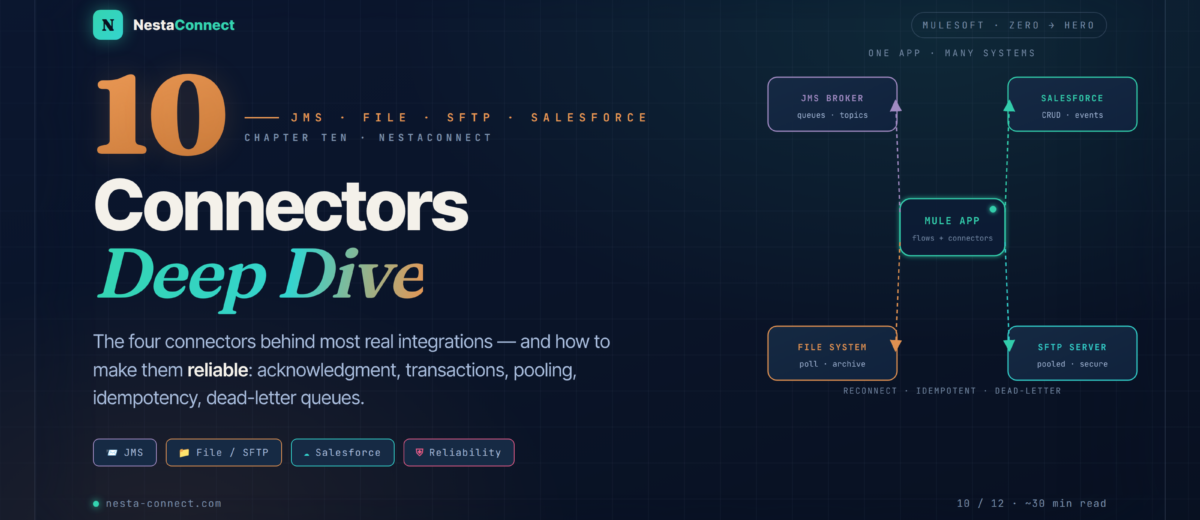
JMS, File, FTP/SFTP and Salesforce — the four connectors behind most real integrations. Not just how to wire them up, but how to make them reliable: acknowledgment, transactions, connection pooling, idempotency, and dead-letter queues.
You’ve used the HTTP and Database connectors throughout this series, and in Chapter 9 you learned to reshape whatever data they return. But the Anypoint ecosystem has hundreds of connectors, and four of them appear again and again: JMS for asynchronous messaging, File and FTP/SFTP for moving files, and Salesforce — the most-used SaaS connector on the platform. This chapter is about configuring them and making them production-grade.
The companion repo carries a runnable Mule project for this chapter: an ActiveMQ JMS config with transactional publish/consume, a File lifecycle flow, an SFTP config with a pooling profile and reconnection, Salesforce query/create/upsert/streaming examples, and the complete SFTP → JMS → Salesforce order pipeline with a dead-letter queue.
→ github.com/nestaconnect/mulesoft-from-zero-to-heroBy the end of this chapter you will:
- Use JMS queues and topics, and choose the right acknowledgment and transaction settings for reliability
- Poll directories safely with the File connector — matchers, size checks, and archive-on-success
- Move files over FTP/SFTP with connection pooling and reconnection strategies
- Perform CRUD, SOQL queries, upserts, and streaming subscriptions against Salesforce — and load at scale with Bulk API v2
- Apply the reliability patterns every connector integration needs: reconnection, idempotent receivers, and dead-letter queues
- Assemble a complete order pipeline: SFTP ingest → validate → JMS → enrich → Salesforce upsert, with full error handling
01 · The Ecosystem — Four Connectors, Two Styles
Connectors fall along two axes that decide how you design around them. The first is synchronous vs asynchronous: an HTTP or Salesforce call blocks until it returns, while a JMS publish hands a message off and moves on. The second is messaging style: point-to-point (one consumer per message) versus publish-subscribe (every subscriber gets a copy). Get these right and the rest is configuration.
02 · JMS — Asynchronous Messaging That Survives Failure
Java Message Service (JMS) is the standard for asynchronous messaging between applications. Mule’s JMS connector talks to any JMS-compliant broker — ActiveMQ, IBM MQ, or RabbitMQ via its JMS plugin. The whole point is decoupling: a producer drops a message and walks away; a consumer processes it whenever it’s ready, independently scaled.
2.1 · Connection & publishing
Configure a connection to the broker once, then publish with a single operation. The acknowledgment mode and transaction settings — not the publish itself — are what make it reliable.
<jms:config name="JMS_Config">
  <jms:active-mq-connection>
    <jms:factory-configuration brokerUrl="tcp://broker:61616"/>
  </jms:active-mq-connection>
</jms:config>

<flow name="publish-order">
  <http:listener config-ref="HTTP" path="/orders"/>
  <!-- destinationType defaults to QUEUE; set TOPIC to broadcast -->
  <jms:publish config-ref="JMS_Config" destination="orders.in"/>
</flow>
2.2 · Consuming with manual ack & transactions
The jms:listener source consumes messages as they arrive. Set ackMode="MANUAL" so a message is only acknowledged after you’ve successfully processed it — if the flow errors before the jms:ack, the broker redelivers. Wrapping the listener in a transaction makes consume-and-write atomic.
<flow name="consume-order">
  <jms:listener config-ref="JMS_Config" destination="orders.in"
                ackMode="MANUAL" transactionalAction="ALWAYS_BEGIN">
  </jms:listener>

  <flow-ref name="persist-order"/>

  <!-- only ack once processing succeeded; errors roll back & redeliver -->
  <jms:ack ackId="#[attributes.ackId]"/>
</flow>Most brokers guarantee at-least-once delivery, not exactly-once. A consumer can legitimately see the same message twice (a redelivery after a timeout). Make your processing idempotent — track processed message IDs in an Object Store and skip duplicates — so a redelivery is harmless. We build exactly this pattern in §6.
03 · File — Polling Directories Without Losing Data
The File connector picks up files from local or network directories, processes them, and archives them. The classic mistakes are reading a file that’s still being written, and losing a file when processing fails. Mule 4’s listener solves the first with a size check and the second with explicit move-on-error.
moveToDirectory archives the file automatically. On failure it does not — an error cancels the move — so you move the file to an error folder yourself inside the error handler.<flow name="process-inbound-files">
<file:listener config-ref="File_Config" directory="/data/in"
moveToDirectory="/data/archive" autoDelete="false"
timeBetweenSizeCheck="2" timeBetweenSizeCheckUnit="SECONDS">
<scheduling-strategy><fixed-frequency frequency="10000"/></scheduling-strategy>
<file:matcher filenamePattern="*.csv"/> <!-- only .csv -->
</file:listener>
<flow-ref name="parse-and-load"/>
<error-handler>
<on-error-continue type="ANY">
<!-- on failure the auto-archive is skipped, so move it ourselves -->
<file:move config-ref="File_Config"
sourcePath="#[attributes.path]"
targetPath="/data/error"/>
</on-error-continue>
</error-handler>
</flow>Older tutorials reach for fileAge, fileSize, and moveToPattern. None of those exist on the Mule 4 listener. Use timeBetweenSizeCheck (+ timeBetweenSizeCheckUnit) to avoid partial reads, a <file:matcher> for filtering, and moveToDirectory + renameTo for archiving. File connector reference →
04 · FTP / SFTP — Secure, Pooled Remote Transfer
The FTP and SFTP connectors mirror the File connector’s API — the same listener, read, write, and move operations — but over a remote server. Two things matter for production: a connection pool (opening an SFTP session is expensive, so reuse them) and a reconnection strategy (remote servers blip; retry transient failures instead of failing the flow).
<sftp:config name="SFTP_Config">
  <sftp:connection host="sftp.partner.com" port="22"
                   username="acme" password="${sftp.password}">
    <!-- reuse connections instead of opening one per operation -->
    <pooling-profile maxActive="5" maxIdle="2"
                     exhaustedAction="WHEN_EXHAUSTED_WAIT"/>
    <!-- retry transient network failures -->
    <reconnection>
      <reconnect frequency="5000" count="3"/>
    </reconnection>
  </sftp:connection>
</sftp:config>

<flow name="sftp-poll">
  <sftp:listener config-ref="SFTP_Config" directory="/orders/in"
                 autoDelete="false" timeBetweenSizeCheck="2">
    <scheduling-strategy><fixed-frequency frequency="15000"/></scheduling-strategy>
    <sftp:matcher filenamePattern="order-*.csv"/>
  </sftp:listener>
  <flow-ref name="parse-and-load"/>
</flow>On the SFTP connector, moveToDirectory only archives to another directory on the same remote server — it can’t move a file down to a local path. To bring a file local, read/process it and write locally, then move or delete the remote copy. Prefer watermarkEnabled or an Object Store of processed names over autoDelete so a failed run doesn’t silently drop a file.
05 · Salesforce — CRUD, SOQL, Upsert & Streaming
The Salesforce connector is the most-used SaaS connector on the platform. It does full CRUD, SOQL queries, upserts keyed on an external ID, real-time event streaming, and high-volume loads through Bulk API v2. Authentication is OAuth 2.0 — for server-to-server integrations, the JWT bearer flow needs no interactive login.
<!-- SOQL query → returns a list of records -->
<salesforce:query config-ref="Salesforce_Config">
  <salesforce:salesforce-query>
    SELECT Id, Name, Email FROM Contact WHERE Account.Name = ':acct'
  </salesforce:salesforce-query>
  <salesforce:parameters>#[{ 'acct': payload.account }]</salesforce:parameters>
</salesforce:query>

<!-- create expects an ARRAY of records, even for a single one -->
<salesforce:create type="Contact" config-ref="Salesforce_Config">
  <salesforce:records>#[[
    {
      LastName: payload.lastName,
      Email: payload.email,
      AccountId: payload.accountId
    }
  ]]</salesforce:records>
</salesforce:create>
An upsert matches on an external-ID field — create the record if no match exists, update it if one does. This is the safe operation for re-runnable integrations, because replaying the same upsert twice converges to the same state.
<salesforce:upsert type="Account"
                   externalIdFieldName="External_Id__c"
                   config-ref="Salesforce_Config">
  <salesforce:records>#[[
    {
      External_Id__c: payload.externalId,
      Name: payload.name,
      Type: payload.type
    }
  ]]</salesforce:records>
</salesforce:upsert>
5.1 · Streaming events
Salesforce can push changes to your Mule app in real time over the Streaming API — PushTopics, Platform Events, and Change Data Capture. Use the subscribe-channel-listener source (or replay-channel-listener when you need to replay missed events by replayId).
<flow name="on-new-case">
  <salesforce:subscribe-channel-listener config-ref="Salesforce_Config"
        streamingChannel="/topic/NewCases"/>
  <logger level="INFO" message="#[payload.payload.CaseNumber]"/>
</flow>The standard create/update/upsert operations are perfect up to a few hundred records per call. For nightly loads of thousands-to-millions, switch to Bulk API v2 operations (e.g. create-bulk, upsert-bulk), which chunk records into asynchronous jobs and return per-record results — and which respect your org’s API limits far better than looping single calls. We cover large-scale loading properly in Chapter 11.
06 · Reliability — The Patterns Every Connector Needs
Connectors touch the network, and the network fails. Three patterns turn a fragile integration into a robust one, and they recur across every connector in this chapter.
<flow name="process-once">
  <jms:listener config-ref="JMS_Config" destination="orders.in" ackMode="MANUAL"/>

  <os:contains objectStore="processedIds" key="#[attributes.properties.JMSMessageID]"
               target="seen"/>

  <choice>
    <when expression="#[not vars.seen]">
      <flow-ref name="do-the-work"/>
      <os:store objectStore="processedIds"
                key="#[attributes.properties.JMSMessageID]">
        <os:value>#[now()]</os:value>
      </os:store>
    </when>
    <otherwise>
      <logger level="INFO" message="Duplicate — skipping"/>
    </otherwise>
  </choice>

  <jms:ack ackId="#[attributes.ackId]"/>
</flow>
07 · Case Study — Order Pipeline — SFTP → JMS → Salesforce
A retailer receives orders as CSV files over SFTP from a legacy system. The goals: pick up files reliably, validate each order, decouple ingestion from the slow Salesforce writes, and never silently lose an order. The shape: SFTP ingest → validate → JMS queue → consumer → Salesforce upsert, with bad files moved aside and permanently-failing messages routed to a dead-letter queue.
7.1 · Ingest & publish
<flow name="sftp-order-ingest">
  <sftp:listener config-ref="SFTP_Config" directory="/orders/in"
                 moveToDirectory="/orders/archive" timeBetweenSizeCheck="2">
    <scheduling-strategy><fixed-frequency frequency="15000"/></scheduling-strategy>
    <sftp:matcher filenamePattern="order-*.csv"/>
  </sftp:listener>

  <!-- CSV → array of order objects -->
  <ee:transform>
    <ee:message><ee:set-payload><![CDATA[%dw 2.0
output application/json
---
payload map (row) -> {
  orderId:       row.orderId,
  customerEmail: row.email,
  total:         row.total as Number,
  sku:           row.sku
}]]></ee:set-payload></ee:message>
  </ee:transform>

  <foreach collection="#[payload]">
    <flow-ref name="validate-order"/>
    <jms:publish config-ref="JMS_Config" destination="orders.in"/>
  </foreach>

  <error-handler>
    <on-error-continue type="ANY">
      <sftp:move config-ref="SFTP_Config"
                 sourcePath="#['/orders/in/' ++ attributes.name]"
                 targetPath="#['/orders/error/' ++ attributes.name]"/>
    </on-error-continue>
  </error-handler>
</flow>
7.2 · Consume & upsert
<flow name="jms-order-consumer">
  <jms:listener config-ref="JMS_Config" destination="orders.in"
                ackMode="MANUAL" transactionalAction="ALWAYS_BEGIN"/>

  <flow-ref name="enrich-with-product"/>

  <!-- upsert is idempotent: replaying converges to the same record -->
  <salesforce:upsert type="Order__c" externalIdFieldName="Order_ID__c"
                     config-ref="Salesforce_Config">
    <salesforce:records>#[[
      {
        Order_ID__c:       payload.orderId,
        Customer_Email__c: payload.customerEmail,
        Total_Amount__c:   payload.total,
        Status__c:         "New"
      }
    ]]</salesforce:records>
  </salesforce:upsert>

  <jms:ack ackId="#[attributes.ackId]"/>

  <error-handler>
    <!-- rollback → broker redelivers; after maxRedelivery it routes to the DLQ -->
    <on-error-propagate type="ANY"/>
  </error-handler>
</flow>Files are ingested reliably and bad ones are quarantined. JMS decouples slow Salesforce writes from fast file polling, so each side scales on its own. A failed upsert rolls the transaction back and the broker redelivers; after the configured maxRedelivery the message lands in the dead-letter queue for a human, instead of blocking every order behind it. The pipeline runs thousands of orders a day hands-off.
08 · Best Practices — Connector Rules That Pay Off
| Practice | Why it matters | How |
|---|---|---|
| Reconnection strategies | Networked connectors hit transient failures | <reconnection><reconnect frequency count/> on JMS & SFTP |
| Idempotent receivers | At-least-once delivery means duplicates happen | Track processed IDs in an Object Store; skip repeats |
| Size checks on files | Reading a half-written file corrupts data | timeBetweenSizeCheck + a <file:matcher> |
| Pool connections | Opening SFTP/JMS sessions is expensive | <pooling-profile maxActive maxIdle/> |
| Test the error paths | Happy-path-only flows fail in production | Simulate broker downtime, bad creds, malformed data |
| Transactions for atomicity | Consume + write must both happen or neither | transactionalAction="ALWAYS_BEGIN" on the listener |
09 · Recap — What You Now Know
Async messaging that survives failure
Queues load-balance, topics broadcast. Manual ack + transactions make consume-and-write reliable and replay-safe.
- Queue = one consumer; topic = all
ackMode="MANUAL"+jms:acktransactionalActionfor atomicity- At-least-once → design idempotent
Poll without losing data
Mule 4 listener uses size checks and matchers; archive on success, and move to an error folder yourself on failure.
timeBetweenSizeCheck, notfileAge<file:matcher>to filtermoveToDirectoryon success- Move on error in the handler
Secure, pooled remote transfer
Same API as File, over the network. Pool connections and add reconnection so blips don’t fail the flow.
<pooling-profile>reuse sessions<reconnection>for transient errorsmoveToDirectory= remote only- Watermark over
autoDelete
CRUD, SOQL, upsert, streaming
Create/upsert take an array of records; upsert keys on an external ID; subscribe to events; bulk-load at scale.
- Records are arrays, even for one
- Upsert on
externalIdFieldName subscribe-channel-listener- Bulk API v2 for big loads
The patterns that recur
Reconnection, idempotent receivers, and dead-letter queues turn fragile connector flows into robust ones.
- Object Store dedup on message ID
- DLQ after max redelivery
- Reconnect transient failures
- Transactions for atomic steps
SFTP → JMS → Salesforce
A decoupled order pipeline: reliable ingest, a queue in the middle for independent scaling, idempotent upserts, and a DLQ.
- JMS decouples ingest from writes
- Bad files → error folder
- Failed messages → dead-letter queue
- Upsert keeps replays safe
The companion repo carries the full Mule project: the ActiveMQ JMS config with transactional consume, the File and SFTP lifecycle flows, the Salesforce query/create/upsert/streaming snippets, the idempotent-receiver flow, and the end-to-end SFTP → JMS → Salesforce order pipeline with its dead-letter queue. Clone it, point it at a sandbox, and watch orders flow.
→ github.com/nestaconnect/mulesoft-from-zero-to-hero