Three ways to process a collection in Mule 4 — and picking the wrong one means exhausted memory, lost data on a single failure, or a job that runs for a day. Here’s the decision in plain terms, with the exact signals that tell you which to reach for.
Every integration eventually has to loop over a collection — a list of orders, a file of customers, a query result. Mule 4 gives you three fundamentally different tools for it, and they are not interchangeable. The whole choice comes down to three questions: how much data, how much fault-tolerance, and do you need per-record error isolation?
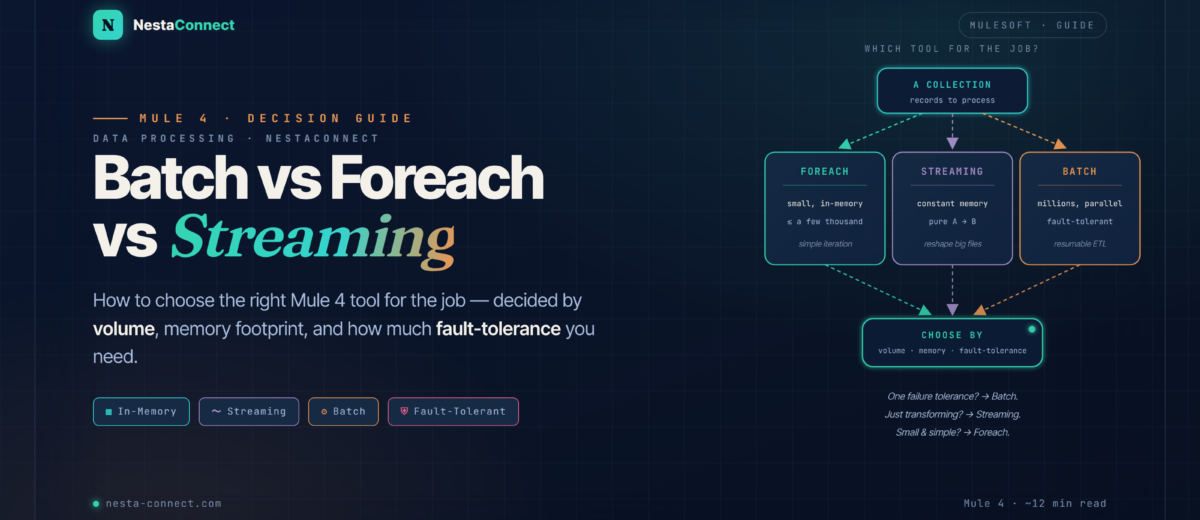
TL;DR — The 10-Second Answer
Three tools, three jobs. Match the shape of your work to one of these and you’ll rarely go wrong.
Small & simple
Iterate a modest collection in memory — low overhead and easy to reason about, but one unhandled error can stop the whole loop.
- ≲ a few thousand records
- Fits comfortably in heap
- Optional parallelism
- No per-record recovery
Pure A → B, any size
Reshape a huge payload in constant memory — records flow through without the whole document ever being materialized at once.
- Constant memory footprint
- Forward-only, single-pass
- No per-record retry
- A transform, not a workflow
Volume with a workflow
Splits records onto a persistent queue, processes parallel blocks, isolates errors per record, and resumes after a crash.
- Millions of records
- Parallel by default
- Per-record error isolation
- Resumable on crash
If you need fault-tolerant, resumable, per-record processing at volume — it’s Batch. If you’re reshaping a large payload A → B with no per-record logic — it’s streaming. Everything else small and simple — foreach.
01 · foreach — Sequential, In-Memory Iteration
The foreach scope iterates a collection one element at a time, keeping the whole collection in memory. parallel-foreach does the same across several threads. Both are the right call when the collection is modest and you don’t need sophisticated error recovery.
<!-- one element at a time, held in heap -->
<foreach collection="#[payload]">
  <flow-ref name="processOne"/>
</foreach>
The catch: foreach loads the entire collection into the heap, and by default an unhandled error in any iteration stops the loop. That’s fine for a few hundred records — fatal for a few million.
parallel-foreach runs iterations concurrently, but it still holds everything in memory and collects all results before continuing. It speeds up I/O-bound work; it does not make foreach safe for huge volumes.
02 · Streaming — Constant-Memory Transforms
When the job is a pure transformation — read a big payload, reshape it, write it out, with no per-record branching or external calls — DataWeave streaming processes it in constant memory. Records flow through without the whole document ever being materialized at once.
// deferred + a streamed source: never fully in heap
%dw 2.0
output application/json deferred=true
---
payload map (row) -> {
  id:   row.customerId,
  name: upper(row.fullName)
}
This is how you convert a 10 GB CSV to JSON without an out-of-memory crash. But streaming is forward-only and single-pass: you can’t retry an individual record, branch failures to a dead-letter table, or resume after a crash. It’s a transform, not a workflow.
03 · Batch — Volume With a Workflow
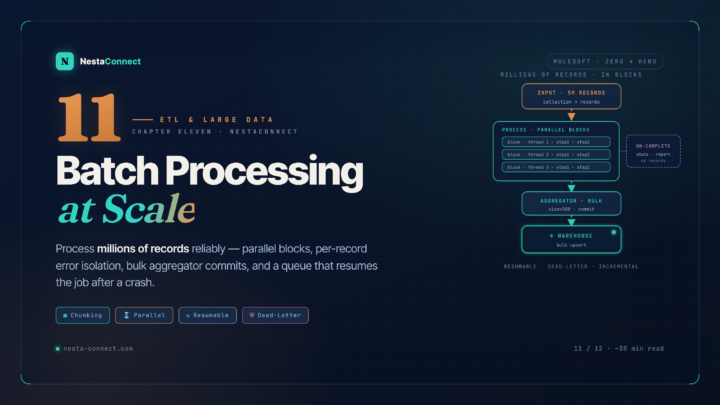
The Batch module is the heavyweight: it splits the incoming collection into individual records on a persistent on-disk queue, processes them in parallel blocks, isolates errors per record, and resumes automatically if the runtime crashes mid-job. It exists for exactly the case the other two can’t handle — high volume with a real workflow around each record.
<batch:job jobName="customerEtl" blockSize="100">
  <batch:process-records>
    <batch:step name="validate">          <!-- per record -->
      <!-- transform, call APIs, raise errors -->
    </batch:step>
    <batch:step name="load" acceptPolicy="NO_FAILURES">
      <batch:aggregator size="100">
        <!-- bulk commit 100 at a time -->
      </batch:aggregator>
    </batch:step>
  </batch:process-records>
  <batch:on-complete> <!-- stats only --> </batch:on-complete>
</batch:job>
The overhead — queues, blocks, three phases — is real, which is exactly why you don’t use it for a list of ten. But for an ETL sync, a bulk Salesforce upsert, or a nightly warehouse load, it’s the only tool that gives you parallelism, per-record error isolation, and crash recovery together.
Writing to your database in the on-complete phase. On-complete can only see statistics, not records — the insert would have nothing to write. External writes belong in a batch step or aggregator. On-complete is for the run report and advancing a watermark.
Compare — The Signals, Side by Side
| Signal | foreach | Streaming | Batch |
|---|---|---|---|
| Volume | ≲ thousands | Any (constant mem) | Millions |
| Memory | Whole collection | Constant | Chunked / on-disk |
| Parallel | Optional | No | Yes, by default |
| Per-record errors | No (stops loop) | No | Yes (isolated) |
| Resume on crash | No | No | Yes (persistent queue) |
| External calls / record | OK | Avoid | OK (in steps) |
| Best for | Small loops | Big A→B reshape | ETL · sync · bulk |
The full chapter builds a complete, resumable 5-million-record SQL Server → Snowflake migration with the Batch module — an incremental watermark, aggregator bulk-upsert, and a dead-letter table for rejects. It’s part of the free MuleSoft from Zero to Hero series.
→ Chapter 11: Batch at Scale · the full seriesFAQ — Common Questions
Is parallel-foreach the same as the Batch module?
No. parallel-foreach runs iterations concurrently but holds the whole collection in memory and has no per-record error isolation or crash recovery. The Batch module chunks records onto a persistent queue, isolates failures per record, and resumes after a crash. Use parallel-foreach to speed up a modest I/O-bound loop; use Batch for fault-tolerant volume.
When is streaming better than the Batch module?
When the work is a pure transformation — reshaping a large payload from one format or shape to another with no per-record external calls, branching, or retry. Streaming gives you constant memory and is simpler. The moment you need per-record error handling or resumability, switch to Batch.
What record count means I should switch from foreach to Batch?
There’s no hard number, but a practical line is a few thousand records — or any point where the collection won’t comfortably fit in heap, a single bad record shouldn’t fail the whole run, or the job needs to survive a restart. Hit any of those and reach for Batch.
Does the Batch module work the same on CloudHub 2.0?
Mostly, with one caveat: batch resumability relies on durable local storage, and CloudHub 2.0 replica storage is ephemeral — a replica restart can lose in-flight batch state. For long, critical jobs there, design for re-runnability (track a watermark, make the load an idempotent upsert) rather than relying on automatic resume.