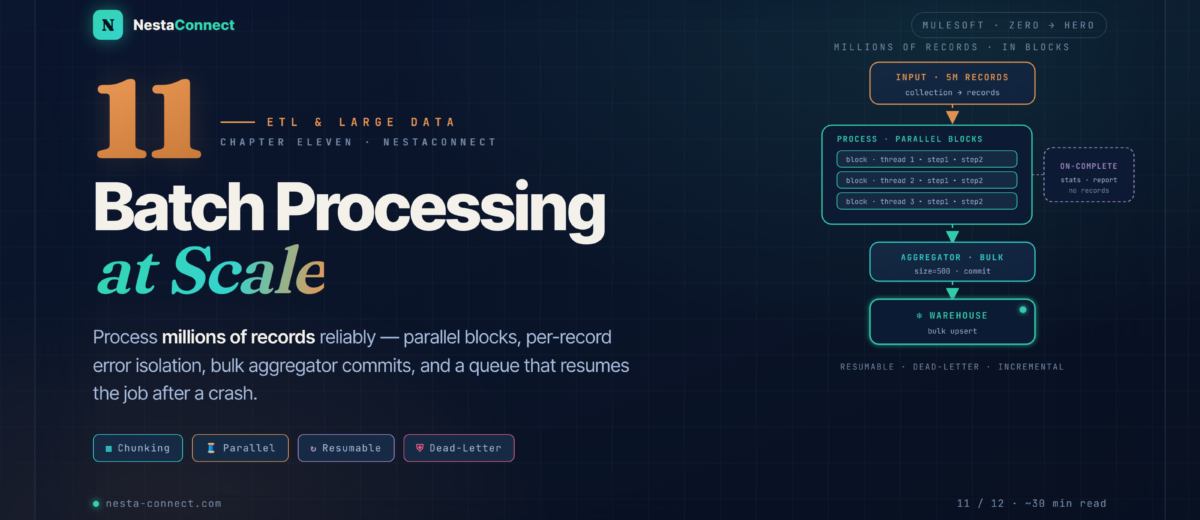
When one-record-at-a-time isn’t an option. The Mule 4 Batch module processes millions of records in parallel blocks, skips bad records without failing the job, commits in bulk through the aggregator, and resumes after a crash — the engine behind every serious ETL pipeline.
So far you’ve processed messages one at a time — an HTTP request, a file, a JMS message from Chapter 10. But what about a nightly job that syncs five million customer records into a data warehouse, or a monthly aggregation across thousands of stores? Process those with a foreach and you’ll exhaust memory, lose everything on a single failure, and run for a day. MuleSoft’s Batch module exists for exactly this: high volume, chunked, parallel, fault-tolerant, and resumable.
The companion repo carries a runnable Batch project: the customer-enrichment job from §3, an aggregator-based bulk-commit example, the concurrency/tuning config, and the complete 5-million-record SQL Server → Snowflake migration with validation, a dead-letter table, an incremental watermark, and an on-complete report.
→ github.com/nestaconnect/mulesoft-from-zero-to-heroBy the end of this chapter you will:
- Know when to reach for batch versus
foreachversus streaming - Design a batch job across its three phases — load-and-dispatch, process, and on-complete
- Filter and route records with
acceptExpressionandacceptPolicy, and commit in bulk with the batch aggregator - Handle failures at the record level without sinking the whole job
- Tune
blockSize,maxConcurrency, and streaming inputs for millions of records - Build a resumable, incremental 5M-record ETL migration with a dead-letter table
01 · When to Batch — Batch vs Foreach vs Streaming
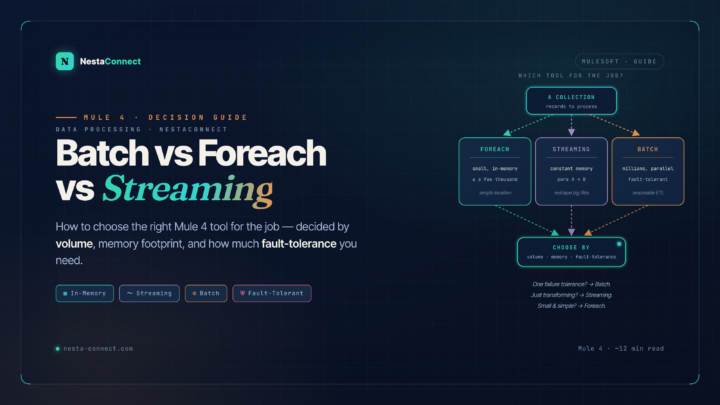
Not every loop needs the Batch module — it adds machinery (queues, blocks, phases) that’s overkill for small collections. The decision comes down to volume, fault-tolerance, and whether you need per-record error isolation.
foreach is right for small in-memory lists; streaming DataWeave for pure A→B reshaping of a large payload. The Batch module earns its overhead when you need volume, parallelism, per-record error isolation, and the ability to resume after a crash.02 · Anatomy — Three Phases and a Stepping Queue
A batch job is a scope you drop into a flow. When an event reaches it, the job performs an implicit split of the incoming payload — which must be a collection — into individual records, then drives them through three phases.
Mule 3 had an explicit input phase element. In Mule 4 the “input” is simply whatever processors run before the <batch:job> scope and leave a collection on the payload — the job splits it implicitly. And critically: the on-complete phase has no access to the processed records, only the result statistics. Any write to an external system (database, warehouse, API) must happen inside a batch step or aggregator, not in on-complete.
03 · Building a Job — Customer Enrichment, End to End
Let’s build a job that reads customers from a CSV, geocodes the US ones via an external API, and writes the enriched records to a database. Note the shape: a <batch:job> scope containing <batch:process-records> with steps, then <batch:on-complete> for the report. Inside a step, payload is a single record.
<flow name="enrich-customers">
  <file:listener config-ref="File" directory="/in">
    <scheduling-strategy><fixed-frequency frequency="60000"/></scheduling-strategy>
  </file:listener>

  <!-- payload is now a List<Customer>; the job splits it into records -->
  <batch:job jobName="customerEnrichment" blockSize="100">
    <batch:process-records>

      <!-- only geocode US customers; others skip this step -->
      <batch:step name="geocode" acceptExpression="#[payload.country == 'US']">
        <http:request config-ref="GeoApi" path="/geocode" method="GET">
          <http:query-params>#[{ q: payload.address ++ ', ' ++ payload.city }]</http:query-params>
        </http:request>
        <ee:transform><ee:message><ee:set-payload><![CDATA[%dw 2.0
output application/json
---
payload ++ { lat: payload.lat, lon: payload.lon }]]></ee:set-payload></ee:message></ee:transform>
      </batch:step>

      <!-- bulk-insert accepted records via the aggregator (NOT on-complete) -->
      <batch:step name="persist">
        <batch:aggregator size="100">
          <db:bulk-insert config-ref="DB">
            <db:sql>INSERT INTO enriched_customers
              (customerId, name, lat, lon)
              VALUES (:customerId, :name, :lat, :lon)</db:sql>
          </db:bulk-insert>
        </batch:aggregator>
      </batch:step>

    </batch:process-records>

    <batch:on-complete>
      <logger level="INFO"
        message="#['Done: ' ++ payload.successfulRecords ++ '/' ++ payload.totalRecords]"/>
    </batch:on-complete>
  </batch:job>
</flow>The acceptExpression on the geocode step quietly skips non-US records — they aren’t failed, just not processed by that step, and they flow on. The persist step uses an aggregator to insert 100 records per round-trip instead of one-at-a-time. On-complete logs the result counts from the batch-result payload — the only thing it can see.
04 · Steps & Filters — Accepting, Routing & Aggregating
Each batch step takes two optional filters: acceptExpression (a DataWeave boolean — process the record only if true) and acceptPolicy (which records to consider based on prior-step outcomes). Together they let you route records down different paths — success here, failures there — without a single if in your flow logic.
acceptPolicy routes records by outcome: NO_FAILURES (the default) sends good records to the load step, ONLY_FAILURES sends rejected ones to a dead-letter step, and ALL processes everything. The aggregator then commits good records in bulk.| acceptPolicy | Processes | Use for |
|---|---|---|
| NO_FAILURES (default) | Only records that succeeded in all prior steps | The normal happy path — load, enrich, commit |
| ONLY_FAILURES | Only records that failed in a prior step | Dead-letter capture, error reporting, retries |
| ALL | Every record, regardless of outcome | Auditing, logging, metrics across the whole set |
The <batch:aggregator> accumulates records so you can commit in bulk. A fixed size="100" hands you arrays of up to 100 records (random access, mutable) — ideal for a db:bulk-insert or a Salesforce bulk upsert. Set streaming="true" instead when the group is unbounded — but then access is sequential and forward-only. Always write your commit to tolerate a final partial group smaller than the configured size.
05 · Concurrency & Resume — Parallelism and Crash Recovery
Mule 4 batch is parallel by default: blocks are pulled from the queue and processed concurrently, while records within a block run sequentially. You don’t toggle “parallel mode” — you cap it. The relevant knobs live on the <batch:job> element.
<batch:job jobName="customerEtl"
           blockSize="200"            <!-- records per block; default 100 -->
           maxConcurrency="8"          <!-- cap parallel blocks; default ≈ 2×cores -->
           maxFailedRecords="-1">      <!-- -1 = never stop; 0 = stop on first failure -->
  <batch:process-records> <!-- ... --> </batch:process-records>
</batch:job>Older examples set processingType="PARALLEL" and threadCount="16" on the job. Neither exists in Mule 4 — processing is already parallel, and you control it with maxConcurrency. Mule’s auto-tuning picks a sensible default (about twice the core count); only override it when a downstream system can’t keep up.
Resumability is the Batch module’s quiet superpower. The stepping queue is persistent on disk by default, so if the application is redeployed or the runtime crashes mid-job, the job resumes from where it stopped rather than restarting from record one. There’s no flag to flip — it’s built in.
That on-disk persistence assumes durable local storage. On CloudHub 2.0, replica storage is ephemeral — a replica restart can lose in-flight batch state. For long, mission-critical jobs there, design for re-runnability instead of relying on resume: track a watermark and make the load idempotent (bulk upsert, not insert), so a fresh run simply continues from the last committed checkpoint.
06 · Performance — Memory Discipline at Volume
Processing millions of records is a memory game. The Batch module already chunks for you, but the input and the commits are where jobs fall over.
| Lever | Why it matters | What to do |
|---|---|---|
| Stream the input | Loading a 10 GB file/query into heap is fatal | Use DB cursor fetching and file streaming so the job is fed lazily |
| Tune blockSize | Bigger blocks = fewer round-trips but more memory | Start at 100; raise for small records, lower for large ones |
| Aggregate commits | One DB/API call per record wastes the network & API quota | Bulk via <batch:aggregator size>, sized to the target’s limit |
| Bound your state | Per-record dedup maps leak memory over millions | Use an Object Store with a TTL, not an in-memory accumulator |
| Tune maxConcurrency | Too many threads overwhelm the downstream system | Match it to CPU and the target’s capacity; load-test it |
07 · Case Study — 5M Records — SQL Server to Snowflake
A telco migrates customer data from a legacy SQL Server table into a Snowflake warehouse. The table has 5 million rows; the job runs nightly and must process only rows changed that day, resume if it dies at 3 million, transform legacy codes, validate email, and reject bad records to a dead-letter table.
NO_FAILURES) bulk-upserts the good records to Snowflake; step 3 (ONLY_FAILURES) writes the rejects to a dead-letter table. On-complete advances the watermark and reports.7.1 · Incremental input
<db:select config-ref="SqlServer" fetchSize="5000">   <!-- cursor fetch, not all-at-once -->
  <db:sql>SELECT * FROM customers
    WHERE lastModified >= :lastRun ORDER BY customerId</db:sql>
  <db:input-parameters>#[{ lastRun: vars.lastRunTimestamp }]</db:input-parameters>
</db:select>
7.2 · Validate & transform (a single record)
%dw 2.0
output application/json
var emailRe = /^[\w.+-]+@[\w-]+\.[\w.-]+$/
// inside a batch step, payload is ONE record
---
{
  customerId: payload.customerId,
  firstName:  (payload.fullName splitBy " ")[0],
  lastName:   (payload.fullName splitBy " ")[-1],
  email:      payload.email,
  status:     payload.statusCode match {
    case "01" -> "ACTIVE"
    case "02" -> "INACTIVE"
    else      -> "UNKNOWN"
  },
  source:       "LEGACY",
  migratedDate: now()
}
The validation that decides accept-vs-reject lives on the step itself. Records failing the expression are skipped by the load step and picked up by the dead-letter step via acceptPolicy.
<batch:job jobName="customerMigration" blockSize="500"
           maxConcurrency="8" maxFailedRecords="-1">
  <batch:process-records>

    <!-- step 1: transform; raise-error makes a bad record "failed" -->
    <batch:step name="validateTransform">
      <ee:transform> <!-- the DataWeave above --> </ee:transform>
      <validation:is-true
        expression="#[payload.email matches /^[\w.+-]+@[\w-]+\.[\w.-]+$/ and payload.firstName != null]"
        message="Invalid email or missing name"/>
    </batch:step>

    <!-- step 2: good records → Snowflake, in bulk -->
    <batch:step name="loadWarehouse" acceptPolicy="NO_FAILURES">
      <batch:aggregator size="500">
        <db:bulk-insert config-ref="Snowflake">
          <db:sql>INSERT INTO customers
            (customerId, firstName, lastName, email, status)
            VALUES (:customerId, :firstName, :lastName, :email, :status)</db:sql>
        </db:bulk-insert>
      </batch:aggregator>
    </batch:step>

    <!-- step 3: rejects → dead-letter table -->
    <batch:step name="deadLetter" acceptPolicy="ONLY_FAILURES">
      <db:insert config-ref="SqlServer">
        <db:sql>INSERT INTO etl_dead_letter
          (customerId, payload, errorReason, ts)
          VALUES (:id, :data, :reason, :ts)</db:sql>
        <db:input-parameters>#[{
          id:     payload.customerId,
          data:   write(payload, 'application/json'),
          reason: error.description default 'validation failed',
          ts:     now()
        }]</db:input-parameters>
      </db:insert>
    </batch:step>

  </batch:process-records>

  <!-- runs once: advance the watermark for next night's incremental run -->
  <batch:on-complete>
    <db:update config-ref="SqlServer">
      <db:sql>UPDATE etl_control SET lastRun = :ts WHERE job = 'customer'</db:sql>
      <db:input-parameters>#[{ ts: now() }]</db:input-parameters>
    </db:update>
    <logger level="INFO"
      message="#['Loaded ' ++ payload.successfulRecords ++ ', failed ' ++ payload.failedRecords]"/>
  </batch:on-complete>
</batch:job>The draft did its Snowflake insert and dead-letter insert in the on-complete phase — but on-complete can’t see the records, only statistics, so those inserts would have nothing to write. Both must live in batch steps: the good-record load in a NO_FAILURES step’s aggregator, the rejects in an ONLY_FAILURES step. On-complete is the right place only for the watermark update and the run report.
With blockSize=500 and parallel blocks, the job moves 5 million records in well under two hours. A transient failure mid-run resumes from the last committed block. Roughly 3% of records (bad email, missing name) land in the dead-letter table for review, and the control-table watermark guarantees the next night’s run is purely incremental.
08 · Best Practices — Batch Rules That Scale
| Practice | Why it matters | How |
|---|---|---|
| Design for idempotency | A resumed or re-run job mustn’t duplicate data | Bulk upsert on a business key; track a watermark |
| Set maxFailedRecords sanely | Don’t let 5 bad rows kill a 5M-row job — or hide a systemic break | -1 for tolerant loads; alert if failure rate spikes |
| Write externals in steps | On-complete can’t see records | Load/commit in a step or aggregator; on-complete for stats only |
| Monitor batch statistics | Silent partial failures are worse than loud ones | Read the result payload in on-complete; alert on failures |
| Load-test at real volume | Behavior changes at scale — memory, locks, API limits | Test with representative millions, not a sample of ten |
| Aggregate, don’t drip | One call per record exhausts API quotas and time | Use the aggregator sized to the target’s bulk limit |
09 · Recap — What You Now Know
The right tool for volume
Batch earns its overhead at scale: millions of records, parallel blocks, per-record error isolation, and crash recovery.
- foreach → small in-memory lists
- streaming DW → pure A→B reshaping
- batch → fault-tolerant volume
- ETL, sync, bulk loads
Load, process, complete
An implicit split feeds a persistent queue; steps run in parallel blocks; on-complete reports once on statistics only.
- No
<batch:input>in Mule 4 - Records split from the payload
- Stepping queue between steps
- On-complete = stats, not records
Accept, route, aggregate
Filter with acceptExpression; route by outcome with acceptPolicy; commit in bulk with the aggregator.
- acceptExpression = DW boolean
- NO_FAILURES / ONLY_FAILURES / ALL
- aggregator size vs streaming
- Bulk commits, not one-by-one
Parallel by default
Blocks run concurrently; you cap with maxConcurrency. blockSize trades memory for round-trips.
maxConcurrency, not threadCountblockSizedefault 100maxFailedRecords-1 = never stop- processingType is Mule 3
Crash-safe by design
The persistent queue resumes a job after a crash. Bad records skip ahead and land in a dead-letter step.
- Persistent queue, automatic
- Resume on redeploy/crash
- CloudHub 2.0 storage is ephemeral
- Dead-letter via ONLY_FAILURES
Incremental, resumable, clean
A nightly SQL Server → Snowflake migration: watermark for incremental, aggregator for bulk, dead-letter for rejects.
- Cursor-fetch incremental input
- Bulk upsert to Snowflake
- Rejects → dead-letter table
- Watermark advanced on-complete
The companion repo carries the full Batch project: the customer-enrichment job, the aggregator bulk-commit pattern, the tuning config, and the complete 5-million-record SQL Server → Snowflake migration with validation, dead-letter routing, the incremental watermark, and the on-complete report. Clone it and point it at a sandbox.
→ github.com/nestaconnect/mulesoft-from-zero-to-hero