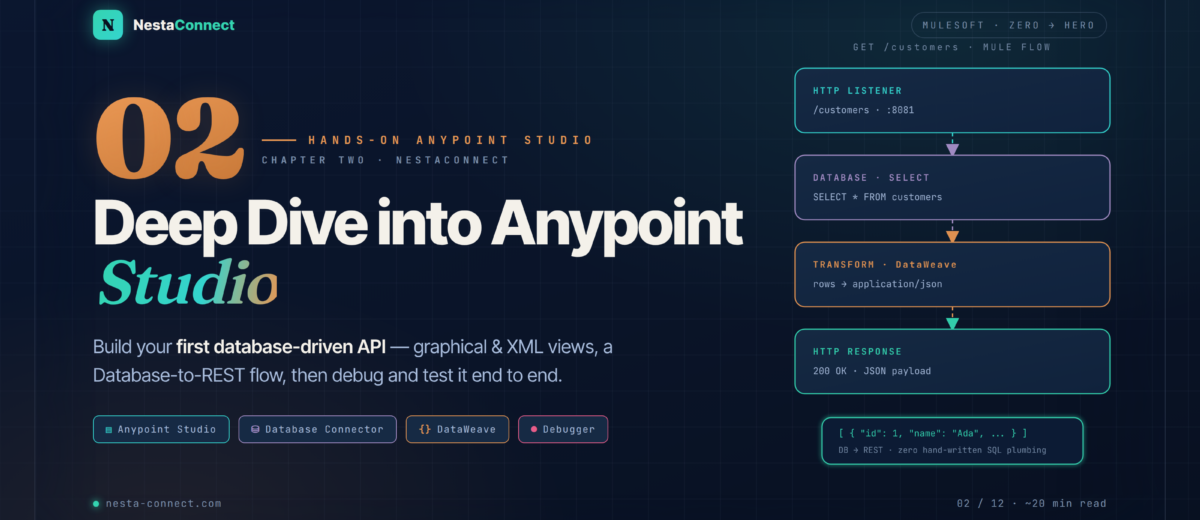
Master Anypoint Studio’s six key areas, build a complete CRUD REST API backed by a database, handle 404 errors, and learn the debugging toolkit every MuleSoft developer needs.
In Chapter 1, we got our feet wet with a “Hello World” API and the big picture of API-led connectivity. Now it’s time to roll up our sleeves and master the tool we’ll use every single day: Anypoint Studio. By the end of this chapter you’ll have built a production-realistic Customer Directory API backed by a real database — with proper 404 handling, parameterised SQL, and externalised configuration.
This entire chapter ships with a runnable Mule project. Clone it, hit mvn mule:run, and you have a working API in 60 seconds — no extra setup.
You’ll come away with the muscle memory to:
- Navigate every area of the Studio interface like a professional
- Read the underlying XML behind any graphical flow
- Build a Customer Directory API with the full 5-endpoint CRUD contract
- Return proper 404 Not Found when a resource doesn’t exist — the right way
- Debug like a senior using Loggers, Breakpoints, and the DataWeave Preview
01 · Recap — Where We Left Off
In Chapter 1 we built this three-component flow:
📥 HTTP Listener  →  ⚡ Set Payload (DataWeave JSON greeting)  →  📝 Logger
GET /hello?name=Maria
It was simple but it demonstrated the core Mule concept: events flowing through components. Now we go much deeper with a production-realistic integration involving a real database, multiple endpoints, error handling, and the patterns you’ll see in every enterprise codebase.
02 · The IDE — Anypoint Studio — A Guided Tour
Studio’s workspace has six key areas you’ll touch every minute of every day. Get comfortable with the geography first — every later trick depends on it.
| # | Area | What lives there | Time spent |
|---|---|---|---|
| 1 | Package Explorer | Project tree · Maven structure · XML files · resources | ~10 % |
| 2 | Canvas | Visual flow design · drag-and-drop components | ~20 % |
| 3 | Mule Palette | 1,000+ connectors and core components · searchable | ~15 % |
| 4 | Properties Editor | Configure the selected component · SQL · DataWeave | ~40 % |
| 5 | Console | Runtime logs · INFO / WARN / ERROR · stack traces | ~10 % |
| 6 | Source tab | Raw XML behind the canvas · always in sync | ~5 % |
Don’t scroll the palette by category. Click the search box at the top and type the component name: db:select, set-variable, scatter-gather. Studio jumps directly to it. Saves hours over a project.
03 · The Anatomy — Project Structure — Maven, Git, & You
A Mule project follows the standard Maven layout. This is not a Studio-only convention — it’s how Java/JVM projects have been organised for two decades. The payoff: every CI tool understands it instantly, Git diffs are clean, and merge conflicts are usually trivial.
mvn clean packageBecause Mule flows are stored as XML (not a binary format), every change shows up as a readable diff in Git. Two developers can work on different flows in the same project without merge hell. Knowing how to read the XML — not just the canvas — makes you 10× more effective during code review, debugging, and CI/CD.
04 · The Build — Customer Directory API — Real Architecture
We’re going to build a real-world integration: a Customer Directory API exposing a database table as a REST service. We’ll use an H2 in-memory database so you don’t need to install anything. This same pattern applies identically to PostgreSQL, MySQL, Oracle, or SQL Server — just swap the JDBC driver and connection URL.
4.1 The Endpoint Contract
| Method | Path | Description | Success | Errors |
|---|---|---|---|---|
GET | /customers | All customers, ordered by ID | 200 + array | — |
GET | /customers/{id} | Single customer | 200 + object | 404 |
POST | /customers | Create new customer | 201 + object | — |
PUT | /customers/{id} | Update existing customer | 200 + object | 404 |
DELETE | /customers/{id} | Delete customer | 204 No Content | 404 |
4.2 Step 1 — Bootstrap the Mule Project
In Studio: File → New → Mule Project · Name: customer-api · Runtime: Mule 4.6.0 LTS · Finish. Studio generates the Maven scaffold with one empty XML file already open.
4.3 Step 2 — Add the Database Connector + H2 Driver
Open the Mule Palette → click Search in Exchange → search “Database” → click Add. Studio updates pom.xml automatically. Then add the H2 driver manually inside <dependencies>:
<!-- Mule Database Connector -->
<dependency>
  <groupId>org.mule.connectors</groupId>
  <artifactId>mule-db-connector</artifactId>
  <version>1.14.0</version>
  <classifier>mule-plugin</classifier>
</dependency>

<!-- H2 in-memory driver — zero install -->
<dependency>
  <groupId>com.h2database</groupId>
  <artifactId>h2</artifactId>
  <version>2.2.224</version>
</dependency>
4.4 Step 3 — Externalise Configuration
Hardcoding the DB URL, port, and credentials in flow XML is an antipattern. Create src/main/resources/config.properties:
# HTTP Listener
http.host=0.0.0.0
http.port=8081

# Database — H2 in-memory, zero install
db.url=jdbc:h2:mem:customerdb;DB_CLOSE_DELAY=-1;MODE=MySQL
db.driver=org.h2.Driver
db.user=sa
db.password=
4.5 Step 4 — Configure the Global Elements
In Global Elements tab → Create:
- Configuration Properties → file:
config.properties - HTTP Listener Config → name:
HTTP_Listener_config· host:${http.host}· port:${http.port} - Database Config → name:
H2_Config· type: Generic Connection · URL:${db.url}· driver:${db.driver}→ click Test Connection → ✅ should succeed
4.6 Step 5 — Bootstrap the Database on Startup
H2 is empty on every boot. Use a Scheduler (fires once at app start) to create the table and seed sample rows. Keep this in its own XML file — db-bootstrap.xml — so it doesn’t clutter the main API:
<flow name="init-db-flow">
  <scheduler>
    <scheduling-strategy>
      <fixed-frequency frequency="999999" timeUnit="DAYS" />
    </scheduling-strategy>
  </scheduler>

  <db:execute-ddl config-ref="H2_Config">
    <db:sql><![CDATA[
      CREATE TABLE IF NOT EXISTS customers (
        id    INT AUTO_INCREMENT PRIMARY KEY,
        name  VARCHAR(100) NOT NULL,
        email VARCHAR(150) NOT NULL,
        city  VARCHAR(100)
      )
    ]]></db:sql>
  </db:execute-ddl>

  <db:insert config-ref="H2_Config">
    <db:sql><![CDATA[
      MERGE INTO customers (id, name, email, city) KEY(id) VALUES
        (1, 'Alice Dupont',  'alice@example.com',  'Paris'),
        (2, 'Bob Martin',    'bob@example.com',    'Lyon'),
        (3, 'Claire Bernard','claire@example.com', 'Marseille')
    ]]></db:sql>
  </db:insert>

  <logger level="INFO" message="✅ Database initialized" />
</flow>
MERGE with KEY(id) is idempotent — it inserts only if the row doesn’t exist. If you used plain INSERT, the second run would fail with a primary-key violation. Always make bootstrap flows idempotent so app restarts don’t crash.
05 · The 404 — GET /customers/{id} — Handling Missing Resources
This is the flow that every junior developer gets wrong. Returning a 500 stack trace when a customer doesn’t exist is unprofessional. Returning a proper 404 Not Found with a clean JSON error body is what production APIs do. Here’s the architecture:
<flow name="get-customer-by-id-flow">
  <http:listener config-ref="HTTP_Listener_config"
                 path="/customers/{id}"
                 allowedMethods="GET">
    <http:response statusCode="#[vars.httpStatus default 200]"/>
  </http:listener>

  <db:select config-ref="H2_Config">
    <db:sql>SELECT id, name, email, city FROM customers WHERE id = :id</db:sql>
    <db:input-parameters>#[{ id: attributes.uriParams.id as Number }]</db:input-parameters>
  </db:select>

  <choice>
    <when expression="#[!isEmpty(payload)]">
      <ee:transform>
        <ee:message>
          <ee:set-payload><![CDATA[%dw 2.0
output application/json
---
{
  id:    payload[0].id,
  name:  payload[0].name,
  email: payload[0].email,
  city:  payload[0].city
}]]></ee:set-payload>
        </ee:message>
      </ee:transform>
    </when>
    <otherwise>
      <set-variable variableName="httpStatus" value="404"/>
      <ee:transform>
        <ee:message>
          <ee:set-payload><![CDATA[%dw 2.0
output application/json
---
{
  error:   "Not Found",
  message: "No customer found with id = " ++ attributes.uriParams.id
}]]></ee:set-payload>
        </ee:message>
      </ee:transform>
    </otherwise>
  </choice>
</flow>
statusCode patternMost listeners default to 200. To override, set vars.httpStatus inside a branch, then reference it from <http:response statusCode="#[vars.httpStatus default 200]"/> on the listener. This pattern scales cleanly to 400, 422, 503, and any other status — and works identically across all 5 endpoints in the companion repo.
5.2 The POST & PUT Pattern — Saving Payload Before DB Op
Here’s a subtle bug that catches every junior. When you do POST /customers, the request body comes in as payload. Then you call db:insert — and the DB connector overwrites payload with its result (the generated keys). Your original data is gone. The fix: stash it in a variable first.
<flow name="create-customer-flow">
  <http:listener config-ref="HTTP_Listener_config"
                 path="/customers" allowedMethods="POST">
    <http:response statusCode="#[vars.httpStatus default 201]"/>
  </http:listener>

  <!-- 🔑 SAVE PAYLOAD FIRST — the DB call will overwrite it -->
  <set-variable variableName="requestBody" value="#[payload]"/>

  <db:insert config-ref="H2_Config" autoGenerateKeys="true">
    <db:sql>
      INSERT INTO customers (name, email, city)
      VALUES (:name, :email, :city)
    </db:sql>
    <db:input-parameters>#[{
      name:  vars.requestBody.name,
      email: vars.requestBody.email,
      city:  vars.requestBody.city default null
    }]</db:input-parameters>
  </db:insert>

  <ee:transform>
    <ee:message>
      <ee:set-payload><![CDATA[%dw 2.0
output application/json
---
{
  id:    payload.generatedKeys.id,
  name:  vars.requestBody.name,
  email: vars.requestBody.email,
  city:  vars.requestBody.city default null
}]]></ee:set-payload>
    </ee:message>
  </ee:transform>
</flow>
06 · Test Drive — Running & Testing the API
Right-click your project → Run As → Mule Application. Watch the console for ✅ Database initialized with sample data. Then hammer the endpoints from a terminal:
# List all customers — 200 OK
curl -s http://localhost:8081/customers | jq
# → [{"id":1,"name":"Alice Dupont","email":"...","city":"Paris"}, …]

# Get one — 200 OK
curl -s http://localhost:8081/customers/2 | jq
# → {"id":2,"name":"Bob Martin","email":"bob@example.com","city":"Lyon"}

# Get missing — 404 Not Found
curl -s -i http://localhost:8081/customers/999
# → HTTP/1.1 404 Not Found
#   {"error":"Not Found","message":"No customer found with id = 999"}

# Create — 201 Created
curl -s -X POST http://localhost:8081/customers \
  -H "Content-Type: application/json" \
  -d '{"name":"Eve Morel","email":"eve@example.com","city":"Nice"}' | jq
# → {"id":4,"name":"Eve Morel","email":"...","city":"Nice"}

# Update — 200 OK
curl -s -X PUT http://localhost:8081/customers/1 \
  -H "Content-Type: application/json" \
  -d '{"name":"Alice DUPONT","email":"alice@example.com","city":"Paris"}'

# Delete — 204 No Content (no body)
curl -s -i -X DELETE http://localhost:8081/customers/3
07 · The Toolkit — Debugging Like a Professional
When something breaks (and it will), you need a systematic debugging toolkit, not guesswork. Studio gives you four tools. Master all four.
7.1 Loggers — Your First Line of Defense
Use the write() function to log Java objects (like DB results) that don’t print readably otherwise:
<!-- Count after DB select -->
<logger level="INFO"
        message="#['Found: ' ++ sizeOf(payload) ++ ' rows']"/>

<!-- Full payload as readable JSON (works for any Java object) -->
<logger level="DEBUG"
        message="#[write(payload,'application/json')]"/>

<!-- All variables at once -->
<logger level="DEBUG"
        message="#[write(vars,'application/json')]"/>
08 · The Habits — Best Practices & Pro Patterns
| Practice | Why it matters | Example |
|---|---|---|
| Meaningful flow names | Code is read more than written — your future on-call self will thank you | get-customer-by-id-flow, not Flow1 |
| One Global Element, many references | Change the DB host once · all flows pick it up · zero risk | H2_Config referenced by 5 flows |
| Externalise via properties | Same app.xml · different config per env · zero code changes | ${db.url} · override in Runtime Manager |
| Split into multiple XML files | Smaller files = cleaner diffs · faster Studio load · fewer conflicts | global.xml, customers-api.xml, db-bootstrap.xml |
| Parameterised SQL only | String concatenation = SQL injection · always :param | Always WHERE id = :id · never '${id}' |
| Save payload before DB ops | DB connectors overwrite payload · you’ll lose the request body | set-variable variableName="requestBody" |
| Idempotent bootstrap flows | App restarts must never crash · use CREATE IF NOT EXISTS + MERGE | Bootstrap fires every boot · same result |
Add src/main/resources/*-secure.properties, *.key, *.jks to your .gitignore. Use Anypoint Secure Properties Tool for credentials at rest, and inject values at runtime via Anypoint Runtime Manager → Properties. We’ll cover Secure Properties end-to-end in Chapter 7.
09 · Recap — Chapter Summary
Six big ideas to carry into Chapter 3:
Six areas of Anypoint Studio
Master the geography first — every later trick depends on it.
- Package Explorer · Canvas · Palette
- Properties Editor · Console · Source tab
- Search the palette — never scroll it
- Canvas and XML stay in sync
Maven layout = Git happiness
Standard Maven project · XML in src/main/mule · MUnit in src/test/munit.
- pom.xml drives builds & deps
- Externalised properties per env
- Split flows into multiple XML files
- Works with Git, CI/CD, code review
Connector + global config
One DB config — referenced by every flow. Parameterised SQL only.
- Define
H2_Configonce - Test Connection before running
- Always use
:namedparameters - Idempotent bootstrap (MERGE not INSERT)
Choice router + httpStatus var
Empty result → 404 · found → 200. Set vars.httpStatus and reference it on the listener.
when/otherwisefor branchingstatusCode="#[vars.httpStatus default 200]"- Structured error envelopes always
- Same pattern scales to 400 / 422 / 503
Save payload before DB ops
DB connectors overwrite payload. Stash it in a variable first.
set-variable variableName="requestBody"- Reference with
vars.requestBody - Especially critical for POST/PUT
- Pattern repeats everywhere — internalize it
Four debugging tools
Logger · Studio Debugger · DataWeave Preview · Console errors.
write(payload,'application/json')- Breakpoints — F6 step · F8 resume
- Preview tab tests DW instantly
- Console always names the failing component
Every snippet in this chapter is part of a runnable Mule 4.6 project. Clone it, hit mvn mule:run, and you have a working API in 60 seconds. The repo also includes a starter MUnit suite that previews Chapter 4.