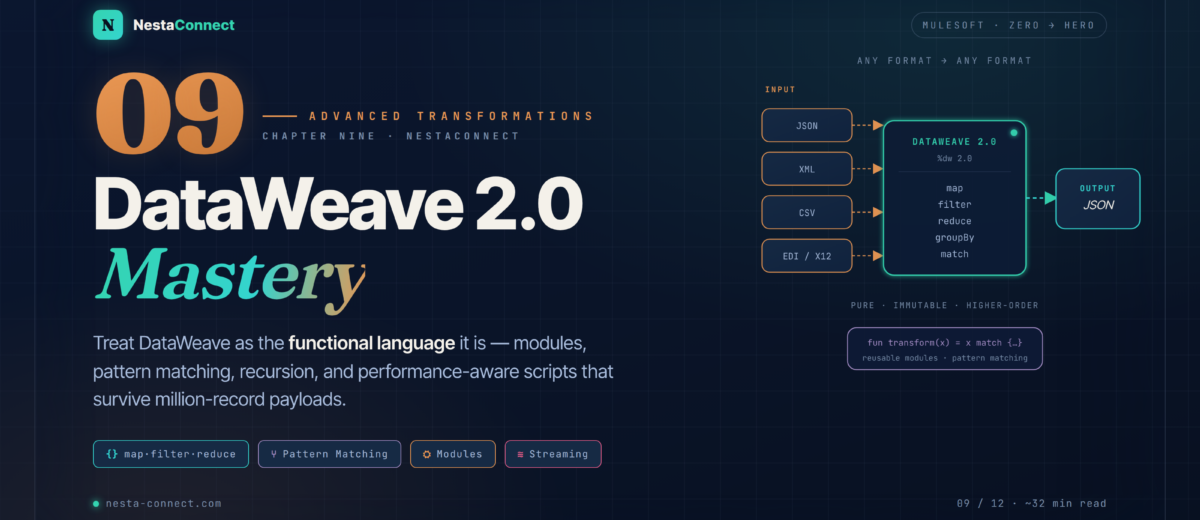
Stop writing DataWeave like a config file and start writing it like the functional language it is — immutable data, higher-order functions, reusable modules, pattern matching, and performance-aware scripts that survive million-record payloads.
In Chapter 8 you turned a working API into a resilient, self-healing platform. Throughout this series you’ve also leaned on DataWeave for the small stuff — mapping a database row to JSON, setting a payload, pulling a query parameter. But DataWeave 2.0 is a full functional programming language, and once you treat it like one, the gnarliest transformation problems — EDI parsing, deep recursion, conditional reshaping, million-record streams — collapse into a few readable lines. This chapter is the deep dive.
The companion repo carries every script in this chapter as runnable .dwl files plus a Mule project: the objects/arrays playground, the math and edi custom modules, the pattern-matching examples, the streaming CSV flow, the full EDI X12 850 → JSON transformation, and the MUnit test suite that validates it.
By the end of this chapter you will:
- Understand DataWeave’s functional nature — immutability, pure functions, higher-order functions, and type inference
- Master advanced operations on objects, arrays, and strings — including
update,flatten, andgroupBy - Write reusable named functions and package them into custom modules you import across projects
- Use pattern matching and recursion to express complex, hierarchical logic cleanly
- Handle failures gracefully inside a transformation with
try,default, and friends - Optimize scripts for performance — streaming, deferred output, and the precedence tricks that matter
- Walk a real-world case study: parsing an EDI X12 850 Purchase Order into clean JSON
- Unit-test DataWeave logic with MUnit so transformations never regress
01 · The Language — DataWeave Is Functional, Not Just a Mapper
DataWeave is declarative and functional: you describe what the output should look like, not the step-by-step how. Four properties define the language, and internalizing them is what separates someone who fights DataWeave from someone who flows with it.
- Immutable data — values are never mutated in place; every operation returns a new value. There are no loops that increment a counter.
- Pure functions — output depends only on input, with no side effects. The same input always yields the same output, which makes transformations trivially testable.
- Higher-order functions — functions take other functions as arguments.
map,filter, andreduceare the workhorses, each receiving a lambda. - Type inference — DataWeave infers types for you, but you can declare them when it sharpens intent or catches bugs early.
--- separator, and a single body expression that behaves as a pure function: feed it input, get a brand-new immutable value back. No mutation, no hidden state.Because every transformation is a pure function of its input, you can reason about it in isolation, unit-test it with fixed fixtures, and compose small functions into big ones without fear of side effects. That’s the entire premise of the DataWeave language — and the reason the rest of this chapter is mostly about writing small, reusable pieces.
02 · Structures — Objects, Arrays, Flatten & Group
Most real transformations are about reshaping objects and arrays. DataWeave gives you a concise vocabulary for both.
2.1 · Objects
Objects in DataWeave are ordered key–value collections. You create them with literals, merge them with the ++ operator, and surgically change a nested field with the update operator — no need to rebuild the whole structure.
%dw 2.0
output application/json
var person = {
  name: "John",
  address: { city: "New York", zip: "10001" }
}
---
{
  // merge two objects with ++
  merged: person ++ { active: true },

  // surgically change one nested field — the rest is untouched
  moved: person update {
    case .address.city -> "Brooklyn"
  },

  // the longer form binds the current value to a variable you can reuse
  bumped: person update {
    case zip at .address.zip -> "BK-" ++ zip
  }
}Introduced in DataWeave 2.3 (Mule 4.3+), update uses the syntax value update { case <name> at <selector> [if(<cond>)] -> <new value> }. Drop the <name> at and DataWeave binds the matched value to the default variable $. Append ! to the selector to upsert — create the key if it doesn’t exist. Update operator reference →
2.2 · Arrays
Arrays are sequences, and the higher-order functions map, filter, reduce, groupBy, and orderBy cover the overwhelming majority of real work. One precedence gotcha worth burning into memory: sum is not an infix operator — it takes an array, so you map first and then sum.
%dw 2.0
output application/json
var items = [
  { product: "Laptop",   price: 1200, qty: 2 },
  { product: "Mouse",    price: 25,   qty: 5 },
  { product: "Keyboard", price: 75,   qty: 3 }
]
---
{
  // sum() takes an array — map to the values first, THEN sum
  totalValue: sum(items map (i) -> i.price * i.qty),

  // filter then map — note: filter runs first, so the map sees fewer items
  expensive: (items filter (i) -> i.price > 100) map (i) -> i.product,

  // groupBy with meaningful string keys instead of true/false
  byTier: items groupBy (i) -> if (i.price > 100) "premium" else "standard"
}
2.3 · Flattening and grouping
Use flatten to collapse an array of arrays into one, and groupBy to do the reverse — nest a flat list under computed keys.
%dw 2.0
output application/json
var nested = [[1, 2], [3, 4], [5]]
---
{
  flat:    flatten(nested),              // [1,2,3,4,5]
  sorted:  flatten(nested) orderBy -$,  // [5,4,3,2,1] (descending)
  biggest: max(flatten(nested))         // 5
}
03 · Functions — Reusable Logic & Custom Modules
The single biggest lever for maintainable DataWeave is to stop inlining logic and start naming it. Three tools: lambdas, named functions, and modules.
3.1 · Lambdas & named functions
Lambdas are anonymous functions — you’ve been passing them to map all along. Promote repeated logic to a named function with the fun keyword.
%dw 2.0
output application/json
fun lineTotal(price, qty) = price * qty
fun withDiscount(total, rate) = total * (1 - rate)

var items = [
  { product: "Laptop", price: 1200, qty: 2 },
  { product: "Mouse",  price: 25,   qty: 5 }
]
---
items map (i) -> {
  product: i.product,
  total:   withDiscount(lineTotal(i.price, i.qty), 0.1)
}
3.2 · Recursion
For hierarchical data — trees, nested arrays, arbitrarily deep objects — recursion paired with pattern matching is the idiomatic tool. The catch every newcomer hits: reduce needs an explicit seed (acc = 0), otherwise the first element becomes the accumulator and is never passed through your function.
%dw 2.0
output application/json
fun sumNested(v) = v match {
  case n is Number -> n
  case a is Array  -> sum(a map sumNested($))
  case o is Object -> sum((o pluck $) map sumNested($))
  else -> 0
}
var data = [1, 2, [3, 4, { a: 5, b: [6, 7] }]]
---
{ result: sumNested(data) } // 1+2+3+4+5+6+7 = 28To walk an object’s values, obj pluck ($) returns an array of values with no import required, whereas valuesOf lives in dw::core::Objects and must be imported. Using sum(array map fn($)) instead of a seedless reduce keeps the recursion correct and obvious.
3.3 · Custom modules
Store reusable functions in their own .dwl files and import them. This is how a team builds a shared transformation library instead of copy-pasting the same date formatter into forty flows.
%dw 2.0
fun add(a, b) = a + b
fun multiply(a, b) = a * b%dw 2.0
import * from modules::math
output application/json
---
{ sum: add(5, 3), product: multiply(5, 3) }Modules are referenced with the :: namespace separator and resolved from src/main/resources — a file at src/main/resources/modules/math.dwl is imported as modules::math, not modules/math. The old slash form you’ll see in older blog posts no longer matches how Mule 4 resolves modules.
04 · Pattern Matching — The match Operator, Done Right
The match operator is a switch statement on steroids: it routes a value to the first matching case, where a case can match on type, regex, a literal value, or an arbitrary boolean guard. Each case can bind the input to a name for reuse. One thing to watch: an object-literal case like case {name: "Alice"} matches only when the value equals that object entirely — to test a single field, use a guard (case p if (p.name == "Alice")).
match evaluates its cases top to bottom and routes to the first one that matches. Order matters: put the most specific cases first and always finish with else so nothing falls through unhandled.%dw 2.0
output application/json
var sNumber = "123"
var person = { name: "Alice", age: 30 }
---
{
classify: sNumber match {
case is Number -> "a number"
case s matches /^\d+$/ -> "a numeric string"
case is String -> "a plain string"
else -> "unknown"
},
// guards read a field, so a partial match works (an object literal
// case would require the WHOLE object to be equal)
greet: person match {
case p if (p.name == "Alice") -> "Hi Alice!"
case p if (p.age > 18) -> "Hi adult"
else -> "Hello"
}
}The original draft used ~= with the pattern "^d+$". Both are wrong: ~= is the similarity operator, not regex, and d matches a literal “d” — you want the digit class \d. For pattern matching use a case … matches /^\d+$/ regex case; for a plain boolean test use the matches function: str matches /^\d+$/.
05 · Error Handling — Failing Gracefully Inside a Script
Transformations fail — a field is missing, a value won’t coerce, an upstream system sent garbage. Rather than letting the whole flow error out, DataWeave lets you contain failure with the try function from dw::Runtime, and supply fallbacks with the default operator.
%dw 2.0
import try from dw::Runtime
output application/json
// try() runs a lambda and captures success/failure instead of throwing
var attempt = try(() -> payload.user.email)
---
{
  email: if (attempt.success) attempt.result
         else "Error: " ++ (attempt.error.message default "unknown"),

  // the default operator supplies a value when something is null or missing
  name:  payload.user.name default "Unknown"
}Reach for default for the common case of a possibly-null or absent field — it’s terse and reads well. Reach for try when an expression could actually throw (a bad type coercion, a divide-by-zero, a malformed selector) and you want to branch on the error or surface its message rather than failing the whole transformation.
06 · Performance — Scripts That Survive Large Payloads
DataWeave is fast, but a careless script on a large payload will eat memory and time. The two levers that matter most are streaming (process input in chunks rather than loading it whole) and deferred output (write lazily as the result is consumed). After that, a handful of habits keep scripts efficient.
| Habit | Why it matters | Do this |
|---|---|---|
| Stream big inputs | Loading a whole file/stream into heap risks OOM | Set streaming=true as a reader property on the source MIME type |
| Defer the output | Materializing the whole result wastes memory | Use output application/json deferred=true to write lazily |
| Filter before you map | Mapping then filtering does wasted work on dropped items | (items filter …) map … — shrink first, transform second |
| Prefer built-ins to reduce | Hand-rolled reduce is easy to get wrong and slower | Use sum, max, min, sumBy where they exist |
| Hoist repeated selectors | Re-indexing a large array repeatedly is costly | Store payload[i] in a var if you use it more than once |
name,email,country
Ada Lovelace,ada@example.com,UK
Alan Turing,alan@example.com,UK
Grace Hopper,grace@example.com,US// reader property streaming=true is set on the SOURCE payload's media type;
// deferred=true tells the writer to emit lazily as records flow through
%dw 2.0
output application/csv deferred=true
---
payload map (row) -> {
name: row.name,
email: row.email
}name,email
Ada Lovelace,ada@example.com
Alan Turing,alan@example.com
Grace Hopper,grace@example.com07 · Case Study — EDI X12 850 Purchase Order → JSON
A logistics company receives EDI X12 850 Purchase Orders from trading partners and needs them as clean JSON for an internal order system. EDI is a flat file of segments (delimited by ~) made of elements (delimited by *). We’ll parse it with a small, readable DataWeave script.
ISA*00*          *00*          *ZZ*SENDER         *ZZ*RECEIVER       *220101*1200*U*00401*000000001*0*T*~
GS*PO*SENDER*RECEIVER*20220101*1200*1*X*004010~
ST*850*0001~
BEG*00*NE*PO12345**20220101~
REF*DP*20220115~
N1*BY*ACME Corp*92*123~
N3*123 Main St~
N4*Springfield*IL*62701~
PO1*1*10*EA*25.00*VC*ITEM001*VP*Widget~
PO1*2*5*EA*45.00*VC*ITEM002*VP*Gadget~
CTT*2~
SE*12*0001~
GE*1*1~
IEA*1*000000001~%dw 2.0
output application/json
// strip line breaks first, then split into segments (~) and elements (*)
var clean = payload replace /[\r\n]/ with ""
var segments = (clean splitBy "~") map ((seg) -> seg splitBy "*")
// helper: first segment whose code (element 0) matches — parens are required
fun seg(code) = (segments filter ((s) -> s[0] == code))[0]
// YYYYMMDD -> YYYY-MM-DD, safely
fun isoDate(d) = if (sizeOf(d default "") >= 8)
d[0 to 3] ++ "-" ++ d[4 to 5] ++ "-" ++ d[6 to 7]
else ""
var beg = seg("BEG")
var ref = seg("REF")
var n1 = seg("N1")
var n3 = seg("N3")
var n4 = seg("N4")
var lines = segments filter ((s) -> s[0] == "PO1")
---
{
poNumber: beg[3] default "",
date: isoDate(beg[5] default ""),
shipBy: isoDate(ref[2] default ""),
buyer: {
name: n1[2] default "",
id: n1[4] default ""
},
address: {
street: n3[1] default "",
city: n4[1] default "",
state: n4[2] default "",
zip: n4[3] default ""
},
items: lines map (po) -> {
line: po[1] as Number,
quantity: po[2] as Number,
unit: po[3],
price: po[4] as Number,
productCode: po[6] // element 6 = VC value (ITEM001), not 7
}
}{
"poNumber": "PO12345",
"date": "2022-01-01",
"shipBy": "2022-01-15",
"buyer": { "name": "ACME Corp", "id": "123" },
"address": {
"street": "123 Main St",
"city": "Springfield",
"state": "IL",
"zip": "62701"
},
"items": [
{ "line": 1, "quantity": 10, "unit": "EA", "price": 25.0, "productCode": "ITEM001" },
{ "line": 2, "quantity": 5, "unit": "EA", "price": 45.0, "productCode": "ITEM002" }
]
}The draft read the product code from po[7] — that’s the VP qualifier, not the code; the value lives at po[6]. And the shipBy field sliced [0 to 7] while claiming to produce YYYY-MM-DD — slicing alone never inserts the dashes. The isoDate helper above does the reformat properly and guards short/missing values.
With element indices corrected and parsing wrapped in a reusable edi module, the logistics company processes thousands of POs a day with a transformation that’s easy to read, test, and extend to the 810 (invoice) and 856 (ASN) document types. Real EDI needs more robust loop handling, but the shape stays exactly this.
08 · Testing — Lock It Down with MUnit
A transformation you can’t test is a transformation that will silently break. Wrap the DataWeave in a flow, then assert on its output with MUnit — the same testing approach from Chapter 4. Feed a known EDI fixture in, assert the JSON that comes out.
<munit:test name="edi-850-to-json-test">
  <munit:behavior>
    <!-- load a known-good EDI fixture from src/test/resources -->
    <munit:set-event>
      <munit:payload value='#[readUrl("classpath://fixtures/po850.edi","text/plain")]'/>
    </munit:set-event>
  </munit:behavior>

  <munit:execution>
    <flow-ref name="transform-edi-850Flow"/>
  </munit:execution>

  <munit:validation>
    <!-- assert the whole document equals the expected JSON -->
    <munit-tools:assert-that
      expression="#[payload.poNumber]"
      is='#[MunitTools::equalTo("PO12345")]'/>
    <munit-tools:assert-that
      expression="#[sizeOf(payload.items)]"
      is='#[MunitTools::equalTo(2)]'/>
    <munit-tools:assert-that
      expression="#[payload.items[0].productCode]"
      is='#[MunitTools::equalTo("ITEM001")]'/>
  </munit:validation>
</munit:test>Because DataWeave is pure, you never need a live trading partner to test it — a fixture file and an equality assertion are enough. Add one fixture per edge case (missing REF segment, multiple PO1 lines, malformed date) and your transformation is locked against regressions for good.
09 · Recap — What You Now Know
Pure, immutable, higher-order
Every script is a header, a ---, and one body expression that behaves as a pure function — predictable and trivially testable.
- Immutable values, no mutation
- Pure functions: input → output
- map / filter / reduce take lambdas
- Types inferred, declarable when useful
Objects & arrays, surgically
Merge with ++, change one nested field with update, reshape with flatten, groupBy, and orderBy.
update { case … at … -> … }sumtakes an array — map first- groupBy with meaningful keys
- flatten collapses nested arrays
Name it, reuse it
Promote logic to fun, recurse over hierarchies, and package shared functions into importable modules.
funfor named functions- Recursion + a seeded reduce
import * from modules::math- One shared library, not 40 copies
match, done right
Route on type, regex, structure, or guard. First matching case wins; always close with else.
case is Number— typecase s matches /^\d+$/— regexcase p if (p.name == …)— guard~=is similarity, not regex
Fail gracefully
Contain failures with try and fill gaps with default instead of erroring the whole flow.
try(() -> …)→ {success, result, error}value default fallback- default for null/missing fields
- try for throwing expressions
Survive large payloads
Stream big inputs, defer output, filter before mapping, and prefer built-ins to hand-rolled reduces.
- Reader
streaming=true - Writer
deferred=true - Filter → map, not map → filter
- Hoist repeated selectors to vars
The companion repo carries every snippet here as runnable .dwl files, the math and edi custom modules, the streaming CSV flow, the complete EDI X12 850 → JSON transformation, and the MUnit suite with fixtures for the happy path and the edge cases. Clone it and run the tests to see green.