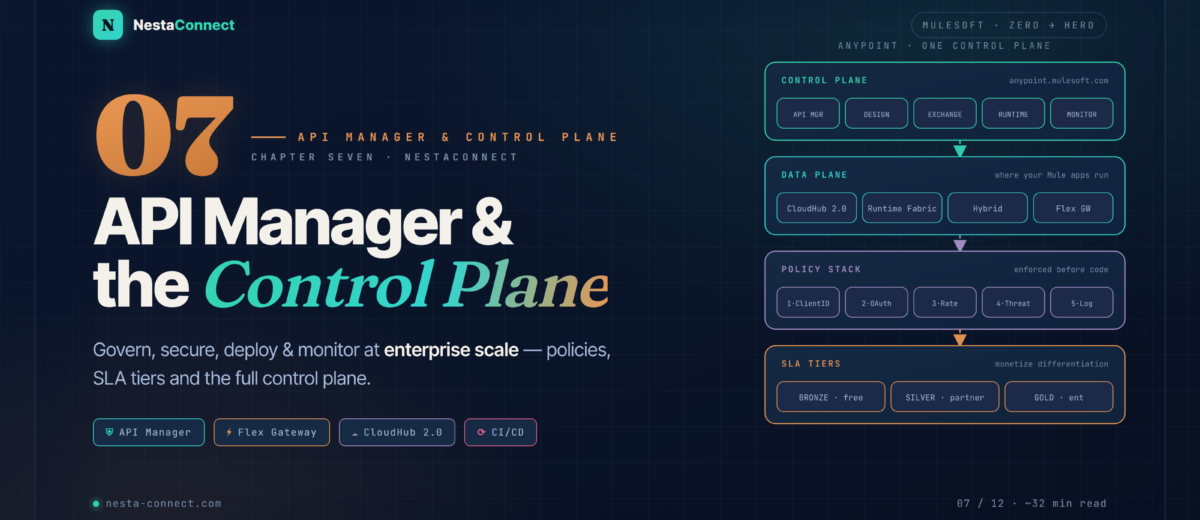
From working API to managed asset — governance, policies, SLA tiers, Flex Gateway, CloudHub 2.0, CI/CD, proxification, and a real bank v1 → v2 migration without a second of downtime.
In Chapter 6 you built a fully working Customer API using APIKit and tested it locally in Studio. Now it’s time to face the real world. A working API isn’t a managed API. Without governance, any client can hammer it with unlimited requests, leaked tokens can grant unauthorized access for months, and a silent database timeout can go undetected for hours. That’s exactly what the Anypoint Platform control plane solves — and this chapter is your complete tour of it.
The companion repo carries a complete deployment scaffold for this chapter — Maven config for CloudHub 2.0, a GitHub Actions pipeline, Flex Gateway local-mode YAML, automated policy definitions, and the full bank-migration case study (v1 proxy + v2 implementation side by side).
→ github.com/nestaconnect/mulesoft-from-zero-to-heroBy the end of this chapter you will:
- Understand the full control-plane architecture and how each component fits together
- Create and manage API instances in API Manager with proper lifecycle states
- Apply and order policies (Rate Limiting, Client ID, OAuth 2.0, IP Allowlist) correctly
- Design SLA tiers for monetization and partner differentiation
- Choose between Flex Gateway and Mule Gateway with confidence
- Deploy to CloudHub 2.0 with zero-downtime rolling updates
- Compare CloudHub 2.0, Runtime Fabric, and Hybrid deployment options
- Automate deployments with Maven and a complete GitHub Actions pipeline
- Apply API proxification to govern legacy systems without rewriting them
- Run a real bank v1 → v2 migration over 90 days with zero downtime
01 · Control Plane — One Dashboard to Rule Them All
Before touching any configuration, let’s understand why the control plane exists. Imagine you’ve built 40 APIs across three teams. Each team deployed on different infra. Some use OAuth, some don’t. Some have rate limits, some are completely open. One API gets DOSed on Black Friday. Another leaks 3 million customer records because a developer forgot to add authentication. Sound familiar? This is the reality without centralized API governance.
The control plane is Anypoint Platform’s answer: a single operational plane that manages the full API lifecycle regardless of where the API is physically deployed — CloudHub, on-premises servers, Kubernetes clusters, or a third-party cloud.
The control plane (API Manager, Exchange, Runtime Manager) runs in Anypoint Platform’s cloud. The data plane is where your actual traffic flows — CloudHub containers, your own Kubernetes clusters, or bare-metal servers. This separation means you can govern APIs across any infrastructure from a single dashboard. API Manager docs →
02 · API Manager — The Heart of Governance
API Manager is where a RAML spec becomes a managed API. Think of it as a control tower that enforces policies, tracks versions, and provides analytics — entirely without touching your Mule application code. Policies apply at the gateway level: they intercept requests before they ever reach your flow.
Why does this matter? Your Mule application should know nothing about rate limiting, IP restrictions, or OAuth token validation. Those concerns belong at the gateway. This separation means you can add, remove, or change a policy without redeploying your app. Enterprises with 50+ APIs enforce org-wide security standards by changing one automated policy.
2.1 · Creating a Managed API — step by step
- Log in to
anypoint.mulesoft.com→ click API Manager in the left nav - Click Add API → Add new API
- Choose your gateway: Flex Gateway (recommended for new APIs) or Mule Gateway
- Select Import from Exchange — find your
customer-management-api - Set the Implementation URI — the URL where your Mule app is actually running (e.g.
https://customer-api.us-e2.cloudhub.io/api) - Click Save & Deploy. API Manager creates an API instance with a unique Auto-discovery ID
The Auto-discovery ID links your running Mule app to the API Manager instance. In your Mule app’s global config, you add <api-gateway:autodiscovery apiId="YOUR_ID" flowRef="customer-api-main"/>. Without this, policies won’t be enforced even if you configure them in API Manager. The auto-discovery ID equals the API instance ID in Mule 4. Auto-discovery docs →
2.2 · API Lifecycle States
Every managed API has a lifecycle state that controls visibility and access. Moving between states sends notifications to registered consumers.
Real-world scenario: A logistics company has 200 partner applications calling their Order API v1. They release v2. They mark v1 as Deprecated — partners see a sunset warning on every response header (Deprecation: true). After 90 days of migration support, they retire v1. Partners who haven’t migrated start getting 410 Gone responses. Clean, professional, zero surprise. (We’ll walk through the full bank version of this story in §9.)
03 · Policies — The Enforcement Layer
Policies are the most powerful feature of API Manager. They are applied at the gateway — before your Mule flow runs — with zero code changes. Policies enable you to enforce regulations to help manage security, control traffic, and improve adaptability of your APIs without modifying the code implementation.
3.1 · Policy Ordering — the sequence matters
When you apply multiple policies, their execution order determines behaviour. The automated policy list is now shown in order of application. A rule of thumb for secure APIs:
# Order 1 — Identity: Who is this?
Client ID Enforcement       # reject unknown apps immediately

# Order 2 — Authorization: Are they allowed?
OAuth 2.0 Token Enforcement # validate Bearer token + scopes

# Order 3 — Volume: How much can they do?
Rate Limiting SLA           # per-app quota based on SLA tier

# Order 4 — Safety: Is the payload safe?
JSON Threat Protection      # reject oversized / malicious JSON

# Order 5 — Visibility: Log what passes through
Message Logging # log for Anypoint MonitoringAs an organization admin, you can apply Automated Policies that apply to all APIs in an environment automatically. For example: enforce Client ID Enforcement on every API in Production. Automated policies support all runtime deployment targets and have priority over the same types of policies already applied to a specific API proxy. This is how large enterprises enforce org-wide security without relying on individual teams to remember.
3.2 · Rate Limiting Deep Dive
Rate Limiting is the most commonly applied policy and comes in two flavours. Understanding the difference is critical for production APIs:
| Policy | Throttles by | When limit exceeded | Best for |
|---|---|---|---|
| Rate Limiting | All calls (global counter) | 429 — request rejected | Total API protection (DDoS defense) |
| Rate Limiting SLA | Per client_id (per-app counter) | 429 — that app rejected, others fine | Fair usage per consumer / monetization |
| Spike Control | All calls (queue instead of reject) | Requests queued up to timeout | Burst absorption (protect slow backends) |
When running multiple Flex Gateway replicas, enable Distributed Rate Limiting with Redis shared storage. Without it, each replica enforces the limit independently — a 100 req/min limit with 4 replicas effectively becomes 400 req/min. With distributed rate limiting, the 100 req/min quota is shared across all replicas. Rate Limiting docs →
04 · SLA Tiers — Monetize and Differentiate Your API
SLA (Service Level Agreement) tiers are how you create tiered access to your API. A free tier might allow 10 req/min. A partner tier might allow 1,000 req/min with priority support. Each tier is attached to a Rate Limiting SLA policy. Developers register their applications, select a tier, and receive a client_id + client_secret.
A single SLA tier named gold can offer a limit of 100 requests per second as well as a limit of 10,000 requests per day. This ensures gold applications don’t exceed a bursting limit of 100 req/sec, while still being capped at the advertised 10,000 req/day quota.
When you publish an API to Exchange with SLA tiers, developers see a Request Access button on the Exchange page. They select their tier. Bronze auto-approves. Silver and Gold send you a notification — you review and approve. The consumer receives their client_id and client_secret and can start calling the API within their quota.
05 · Flex Gateway — The Modern API Gateway
MuleSoft’s Anypoint Flex Gateway is the next-generation, ultra-lightweight gateway designed for modern cloud-native deployments. It runs as a Linux service, a Docker container, or on Kubernetes — anywhere, including outside CloudHub. It is the recommended choice for all new API instances as of 2024.
Why Flex Gateway over Mule Gateway?
- Tiny footprint: Flex Gateway is written in Rust. It starts in milliseconds and consumes a fraction of the memory of a full Mule runtime.
- Works on any infra: Run it in front of any backend — a Spring Boot app, a Node.js service, a legacy SOAP API. It doesn’t have to be Mule at all.
- Two modes: Connected mode (managed by Anypoint Platform) or Local mode (declarative YAML config files — no Anypoint connectivity needed, for air-gapped environments).
- MCP & A2A support (2025): Flex Gateway now supports the Model Context Protocol (MCP) and the Agent2Agent (A2A) Protocol, enabling you to secure, manage, and govern agent interactions. This makes it the right choice for AI agent governance too.
| Feature | Flex Gateway | Mule Gateway |
|---|---|---|
| Runtime | Rust (lightweight process) | Full Mule Runtime (JVM) |
| Deploy targets | Linux · Docker · K8s · CloudHub 2.0 | CloudHub · RTF · On-prem |
| Backend | Any HTTP/HTTPS backend (non-Mule too) | Mule applications only |
| Local (offline) mode | ✅ YAML config, no Anypoint needed | ❌ Not supported |
| Policy engine | WebAssembly (Wasm) based | Mule DSL based |
| AI agent protocols | ✅ MCP + A2A (2025) | ❌ Not supported |
| Recommended for | New APIs, cloud-native, microservices | Existing Mule implementations |
apiVersion: gateway.mulesoft.com/v1alpha1
kind: ApiInstance
metadata:
  name: customer-api-v2
spec:
  address: https://0.0.0.0:8443/api
  services:
    customer-backend:
      address: https://customer-api.internal:8081
      routes:
        - config:
            destinationPath: /api
---
apiVersion: gateway.mulesoft.com/v1alpha1
kind: PolicyBinding
metadata:
  name: customer-api-rate-limit
spec:
  targetRef:
    kind: ApiInstance
    name: customer-api-v2
  policyRef:
    name: rate-limiting-flex
  config:
    rateLimits:
      - maximumRequests: 100
        timePeriodInMilliseconds: 60000
clusterizable: true # share counter across replicas via RedisIf you have existing API instances on Mule Gateway, there’s no rush to migrate — they continue to work. For new APIs, start with Flex Gateway. MuleSoft provides a migration tool to move existing API instances. Flex Gateway docs →
06 · Deployment — Where Does Your App Actually Run?
Runtime Manager gives you a unified dashboard but your apps can run in three very different places. The choice affects cost, control, compliance, and operational overhead. Let’s be honest about the trade-offs.
6.1 · CloudHub 2.0 — Key facts you must know
CloudHub 2.0 is not just “CloudHub 1.0 with a new version number.” It’s a fundamentally different architecture — a fully managed, containerized integration platform as a service (iPaaS) where you can deploy APIs and integrations as lightweight containers. Key differences from CloudHub 1.0:
- Containers, not VMs: Each replica runs in a separate container from every other application. This gives stronger isolation than CloudHub 1.0’s shared workers.
- Zero-downtime updates: CloudHub 2.0 supports updating your applications at runtime so end users of your HTTP APIs experience zero downtime. With rolling update deployment, CloudHub 2.0 keeps the old version running while your update is deploying.
- Up to 16 replicas: The maximum number of replicas per application is now 16 for organizations with the Anypoint Integration Advanced package or a Platinum/Titanium subscription.
- LTS runtime default: Mule 4.4.x is the default version for API proxies deployed to CloudHub, CloudHub 2.0, and Runtime Fabric. For production, always choose Mule 4.6 LTS or later.
6.2 · Deploying to CloudHub 2.0 — step by step
- In Anypoint Studio: right-click project → Anypoint Platform → Deploy to CloudHub
- Or in Runtime Manager: click Deploy application → CloudHub 2.0, upload your JAR, set environment variables
- Configure replica count, size (0.1 vCore for dev, 0.5 for production), and region
- Set Deployment model: Rolling update (zero-downtime, recommended) or Recreate (faster but brief downtime)
- Add Secure Properties for DB passwords and API keys — these are encrypted at rest
<plugin>
  <groupId>org.mule.tools.maven</groupId>
  <artifactId>mule-maven-plugin</artifactId>
  <version>4.2.0</version>
  <extensions>true</extensions>
  <configuration>
    <cloudHub2Deployment>
      <uri>https://anypoint.mulesoft.com</uri>
      <businessGroupId>MC</businessGroupId>
      <environment>Production</environment>
      <target>Cloudhub-US-East-2</target>
      <muleVersion>4.6.14</muleVersion>        <!-- LTS -->
      <applicationName>customer-api-prod</applicationName>
      <replicas>2</replicas>                       <!-- HA -->
      <vCores>0.2</vCores>
      <updateStrategy>rolling</updateStrategy>      <!-- zero downtime -->
      <properties>
        <db.host>${DB_HOST}</db.host>
        <db.password>${DB_PASSWORD}</db.password>
        <mule.env>production</mule.env>
      </properties>
    </cloudHub2Deployment>
  </configuration>
</plugin>
07 · CI/CD — From Commit to Production Without Touching a Button
Manual deployments are the enemy of reliability. Every time a human runs a deployment command, there’s a chance of a typo, a wrong environment, or a forgotten config property. CI/CD eliminates this entirely. Here’s a complete pipeline strategy for MuleSoft APIs.
git push to live traffic. Stages 1–5 fully automated; stage 6 keeps a human in the loop for production — that’s not a bug, it’s the feature that catches the bad Friday-afternoon merge.name: Deploy Customer API to CloudHub 2.0
on:
push:
branches: [ main ]
jobs:
test-and-deploy:
runs-on: ubuntu-latest
steps:
- name: Checkout
uses: actions/checkout@v4
- name: Set up Java 17
uses: actions/setup-java@v4
with: { java-version: '17', distribution: 'temurin' }
- name: Run MUnit Tests
run: mvn clean test
- name: Publish to Exchange
run: |
mvn deploy -DskipTests \
-Danypoint.clientId=${{ secrets.AP_CLIENT_ID }} \
-Danypoint.clientSecret=${{ secrets.AP_CLIENT_SECRET }}
- name: Deploy to CloudHub 2.0 Sandbox
run: |
mvn deploy -DskipTests -DmuleDeploy \
-Denv=Sandbox \
-Ddb.host=${{ secrets.SANDBOX_DB_HOST }} \
-Ddb.password=${{ secrets.SANDBOX_DB_PASS }}
- name: Smoke Test Sandbox
run: |
# Call /health and fail the build if it isn't 200
STATUS=$(curl -s -o /dev/null -w "%{http_code}" \
https://customer-api-sandbox.us-e2.cloudhub.io/api/health)
if [ "$STATUS" != "200" ]; then exit 1; fi
- name: Deploy to Production (manual gate)
if: github.ref == 'refs/heads/main'
environment: production # requires manual approval in GitHub
run: |
mvn deploy -DskipTests -DmuleDeploy \
-Denv=Production \
-DupdateStrategy=rolling \
-Dreplicas=2The example above uses clientId and clientSecret — this refers to a Connected App (client credentials grant), not personal Anypoint credentials. Go to Anypoint Platform → Access Management → Connected Apps → create a new app with the Deploy Application and Manage Applications scopes. This is the recommended approach for automation — personal credentials expire and break pipelines. Connected Apps docs →
08 · Proxification — Govern Without Rewriting
Here’s a scenario that happens constantly in enterprises: a 10-year-old SAP system exposes a SOAP endpoint. A legacy .NET API serves customer data. You can’t rewrite them — the risk is too high, the cost too great. But you need to add rate limiting, OAuth, and monitoring. API proxies are your answer.
An API proxy is a lightweight Mule (or Flex Gateway) application that sits in front of any HTTP backend. It applies API Manager policies and forwards requests. The backend knows nothing about the proxy.
When to use proxies (real decision guide):
- Legacy systems — SAP, SOAP services, Oracle APIs you can’t touch
- Third-party APIs — you’re re-exposing a vendor API with your own rate limiting and auth
- Blue/green deployment — proxy routes 10% traffic to new version, 90% to old; adjust until confident
- Microservices governance — each service is its own Flex Gateway API; one control plane for all
09 · Case Study — Zero-Downtime v1 → v2 Migration at a Bank
Let’s make this concrete. A large European bank has 200 partner applications calling their Customer Information API v1, which runs as a proxy in front of their legacy core banking system. They’ve built v2 on a proper Mule application with the ApiResponse envelope from Chapter 5B. The goal: migrate all 200 partners to v2 without any downtime, over 90 days.
9.1 · Policy stack at each phase
Here’s the exact policy stack applied at each milestone — this is what you’d configure in API Manager’s Policies tab:
## Applied to: Customer Information API — v1 (Proxy)
## Gateway:    Flex Gateway  |  State: Deprecated

## ORDER 1 — Identity
Client ID Enforcement
    credentials: headers (client_id, client_secret)
    expose-headers: false

## ORDER 2 — Volume (halved on Day 60)
Rate Limiting SLA
    Bronze tier:  5 req/min   # was 10 — halved Day 60
    Silver tier: 50 req/min   # was 100 — halved Day 60
    clusterizable: true       # distributed across replicas

## ORDER 3 — Deprecation signal (Day 1, RFC 8594)
Header Injection — Response
    Deprecation: "true"
    Sunset: "Sun, 30 Jun 2026 00:00:00 GMT"
    Link: "<https://api.bank.com/v2/customers>; rel=successor-version"

## ORDER 4 — Logging
Message Logging
    logLevel: INFO
category: v1-deprecation-tracking## Applied to: Customer Information API — v2 (Implementation)
## Gateway: Flex Gateway | State: Production
## ORDER 1 — Identity
Client ID Enforcement
credentials: headers (client_id, client_secret)
## ORDER 2 — Authorization
OAuth 2.0 Token Enforcement
scopes: [ customers:read, customers:write ]
introspection-url: https://auth.bank.com/oauth2/introspect
## ORDER 3 — Volume (per SLA tier)
Rate Limiting SLA
Bronze tier: 10 req/min · 1,000 req/day
Silver tier: 100 req/min · 50,000 req/day
Gold tier: 100 req/sec · 10,000,000 req/day
clusterizable: true
## ORDER 4 — Safety
JSON Threat Protection
maxContainerDepth: 10
maxStringLength: 512
maxEntryCount: 100
## ORDER 5 — Visibility
Message Logging
logLevel: INFO
category: v2-production-traffic9.2 · RACI — who did what
This case study only works if every stakeholder is aligned. Here’s the complete RACI breakdown so you can replicate it:
| Action | Integration Team | API Consumer Teams | Security Team |
|---|---|---|---|
| Publish v2 spec to Exchange | ✅ Owns | Review & feedback | Approve OAuth scopes |
| Apply Deprecation header policy | ✅ Configures in API Mgr | Detect in integration logs | Audits policy config |
| Migrate to v2 envelope | Provides DataWeave guide | ✅ Owns migration code | — |
| Halve v1 quota on Day 60 | ✅ Rate Limiting SLA | Urgency to migrate | Approves change |
| Monitor migration progress | ✅ Monitoring dashboard | Self-service status | Compliance report |
| Retire v1 (Day 90) | ✅ Change state to Retired | Must be on v2 by then | Sign-off required |
The v1 API returned a flat JSON object like { "customerId": 1, "customerName": "John" }. The v2 API returns the full ApiResponse envelope with data: { id: 1, name: "John" }. The team published a one-page DataWeave snippet on Exchange showing partners exactly how to update their transformation: payload.data.name instead of payload.customerName. Partners updated their code in 15 minutes instead of days of detective work. Document the diff — never make consumers figure it out.
10 · Monitoring — Know Before Your Users Do
Anypoint Monitoring replaced the old Mule API Analytics in 2024. Start transitioning to Anypoint Monitoring to monitor APIs effectively. The platform is already enabled by default for CloudHub 2.0 and Runtime Fabric applications.
The most valuable alert patterns for production APIs:
| Alert | Trigger | Threshold | Response |
|---|---|---|---|
| Error spike | 5xx rate rises above baseline | > 5% over 5 min | Page on-call, check recent deploy |
| P95 latency | 95th percentile response time | > 2s over 10 min | Check DB slow queries, upstream APIs |
| Rate limit exhausted | 429 responses to a client | > 100 in 5 min | Contact partner, consider tier upgrade |
| Correlation ID missing | Requests without x-correlation-id | > 0 (should be zero) | Client not following spec — reach out |
| Worker memory high | CloudHub 2.0 replica memory | > 80% for 15 min | Larger replica or memory leak hunt |
You can now use the MuleSoft diagnostics agent to collect diagnostics data from your CloudHub and CloudHub 2.0 applications and analyze them with Einstein. When an application has a persistent error or performance issue, you can trigger Einstein diagnostics from Runtime Manager. It analyzes thread dumps, heap dumps, and logs and returns a plain-English diagnosis. This dramatically reduces MTTR (Mean Time To Resolve) for production incidents. Anypoint Monitoring docs →
11 · Recap — What You Now Know
Policies enforced at the gateway
Zero code changes to your Mule app. Apply identity, traffic, safety, and transformation rules in minutes — and unapply them just as fast.
- 5-tier policy order (identity first)
- Automated org-wide policies
- Auto-discovery links app to instance
- SLA tiers: Bronze · Silver · Gold
Rust-based, ultra-lightweight
Governs any HTTP backend — Mule or not. Runs on Linux, Docker, or Kubernetes. Connected and Local modes for every environment.
- Connected + Local (offline) modes
- Linux · Docker · Kubernetes
- MCP + A2A agent protocols (2025)
- Distributed rate limiting via Redis
Fully managed iPaaS
Twelve global regions. Deploy, scale, and forget about infrastructure. Rolling updates mean zero downtime even for breaking changes.
- Zero-downtime rolling updates
- Up to 16 replicas per app
- Mule 4.6 LTS recommended
- Einstein AI diagnostics built in
Commit to production hands-free
Maven plugin + GitHub Actions. Manual gate for production with smoke-test gating so a bad merge never reaches a paying customer.
- Connected Apps (not user creds)
- Smoke tests gate production
- Manual approval environment
- Secrets in vault — never hardcoded
Govern without rewriting
Legacy systems, SOAP services, third-party APIs — one proxy gets you full governance with zero risk to the underlying code.
- Legacy · SOAP · non-Mule backends
- Blue/green traffic shifting
- RFC 8594 Deprecation + Sunset headers
- v1/v2 in parallel — 90 days
Know before your users do
Replaced Mule API Analytics. On by default for CloudHub 2.0 and RTF. Search logs by correlationId; Einstein diagnoses incidents.
- Alert on error rate + P95 latency
- Einstein AI incident diagnostics
- Search logs by correlationId
- Track v1/v2 traffic volumes live
The companion repo carries the complete deployment scaffold from this chapter — pom.xml with the cloudHub2Deployment config, the GitHub Actions pipeline, Flex Gateway local-mode YAML, the v1 + v2 policy stacks from the bank migration, and an example Connected App configuration. Clone, set your secrets, and you’re one git push away from a live CloudHub 2.0 deployment.