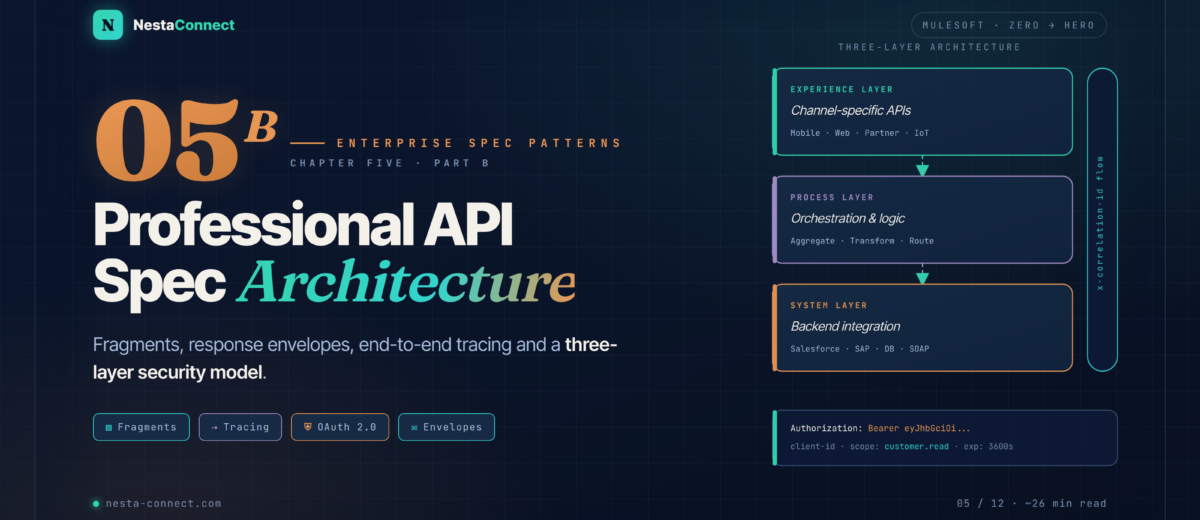
Design patterns that make enterprise APIs maintainable, secure & scalable — project structure, fragments, response envelopes, end-to-end tracing, and three-layer security.
You know how to use the Design Center interface from Chapter 5A. Now we answer the more important question: how should a production-quality API spec be organized? This chapter is the complete blueprint — folder layout, fragment system with MuleSoft’s 2025 governance updates, a standardized response envelope with metadata/data separation, end-to-end tracing with x-correlation-id, a 3-layer security model, and a clean strategy for keeping examples in separate version-controlled files.
The companion repo carries reference .raml files for every pattern in this chapter — the shared library fragment, the traceable trait, the ApiResponse envelope, and the OAuth 2.0 + Client ID security schemes. Clone, adapt, ship.
By the end of this chapter you will:
- Lay out a production-grade RAML or OAS project with clean separation of concerns
- Publish a Library Fragment to Exchange and consume it across multiple specs with one line
- Implement end-to-end request tracing with the
x-correlation-idheader - Standardise every API response with a metadata/data envelope
- Apply three independent security layers — Client ID, OAuth 2.0, and transport
- Keep examples in separate, reusable files that double as test fixtures
01 · Structure — The Complete Project Layout
A well-structured API project separates concerns cleanly: the root spec acts as an orchestrator — it declares what exists but defines nothing directly. Every definition (type, trait, security scheme, example) lives in its own file inside a dedicated folder. This makes specs easier to review, test, and reuse across teams.
Teams at large MuleSoft customers (banks, telcos, retailers) typically maintain a single shared library fragment in Exchange that contains all common types and traits. Any new API spec imports it with one line. When the ErrorDetail type changes, they update the library once — and all 40+ specs stay consistent. No copy-paste drift.
Four principles drive the layout:
- Root file = index only. It should contain nothing but
uses:,securedBy:, and resource paths. If you’re defining a type inline in the root, move it totypes/. - One file per type.
Customer.raml,Order.raml— never bundle multiple types into a single file. Easier to diff, review, and reuse independently. - Never edit
exchange_modules/manually. Managed entirely by Design Center. Add it to.gitignoreif you use Git integration. - Examples mirror the spec. Each endpoint’s request and response example lives in a predictable path:
examples/responses/{resource}-{status}.json. Both the mocking service and integration tests can consume the same file.
02 · Fragments — Create · Publish · Consume (2025)
A Fragment is a standalone Design Center project containing one reusable RAML building block — a DataType, Trait, SecurityScheme, Library, or Example. It is published to Exchange with a semantic version and imported as a dependency into any number of API specs.
Why fragments over copy-paste? Consider a bank with 40 APIs. Without fragments, every team copies the ApiResponse type into their spec. When the risk team adds a required requestId field to all responses, it takes 40 PRs. With a shared library fragment in Exchange, it takes one.
2.1 Library Fragment — One Import, Everything
Instead of importing four separate fragments per spec, publish one Library that bundles your types, traits, and security schemes. A single uses: line pulls all of them.
#%RAML 1.0 Library

# Published to Exchange as: com.example/shared-api-library/2.0.0
usage: |
  Central library for all com.example APIs.
  Import in any spec with:
    uses:
      Lib: exchange_modules/com.example/shared-api-library/2.0.0/library.raml

types:
  ApiResponse:  !include types/api-response.raml
  ErrorDetail:  !include types/error-detail.raml
  Pagination:   !include types/pagination.raml

traits:
  paginable:      !include traits/paginable.raml
  traceable:      !include traits/traceable.raml
  errorResponses: !include traits/error-responses.raml

securitySchemes:
  oauth2:    !include security/oauth2.raml
  clientId:  !include security/client-id-enforcement.raml
Anypoint API Governance lets you define org-wide rulesets (YAML files) specifying design standards: required fields, naming conventions, mandatory x-correlation-id header, security schemes, etc. When a spec or fragment is published to Exchange, Governance automatically validates it and reports violations inline. Non-conforming assets get a ⚠️ governance issues badge and can be blocked from promoting to API Manager. → API Governance docs
03 · Tracing — End-to-End with x-correlation-id
In an API-led architecture, a single user action can trigger a chain of 5–10 API calls across Experience, Process, and System layers. When something fails at 2 AM in production, you need to reconstruct the exact chain in seconds. The x-correlation-id header is the industry-standard mechanism for this.
A customer’s checkout fails. Your logs show an error in the Order Process API. But is it a database timeout? A payment gateway rejection? A stock availability issue from the Inventory System API? Without a correlation ID, you’re searching through millions of log lines from three different systems manually. With correlation ID, you search once: correlationId=a4f8c1d2 — and you see the exact chain, every hop, every millisecond.
3.1 The traceable Trait — RAML 1.0
YAML anchors (&anchor / *alias) are supported by the YAML parser but are not part of the RAML 1.0 type system. Anypoint Design Center may parse them in some contexts, but they are not guaranteed to work in APIKit, API Console, or Exchange rendering. The correct RAML 1.0 pattern is explicit repetition for response headers — keep body definitions in the separate error-responses trait to avoid duplication.
#%RAML 1.0 Trait
usage: Apply to every method that participates in end-to-end tracing.

headers:
  x-correlation-id:
    type: string
    description: |
      Client-generated UUID v4 identifying this request chain end-to-end.
      If absent, the API gateway MUST generate one and return it in responses.
      All downstream calls MUST forward this value unchanged.
    required: false
    pattern: ^[0-9a-fA-F]{8}-[0-9a-fA-F]{4}-4[0-9a-fA-F]{3}-[89abAB][0-9a-fA-F]{3}-[0-9a-fA-F]{12}$
    example: "a4f8c1d2-3e5b-4789-9abc-0d1e2f3a4b5c"

responses:
  # RAML 1.0 does NOT support YAML anchors (&/*).
  # Each status code must be declared explicitly.
  200:
    headers:
      x-correlation-id:
        type: string
        description: Echo of the incoming x-correlation-id (or server-generated).
        example: "a4f8c1d2-3e5b-4789-9abc-0d1e2f3a4b5c"
  201:
    headers:
      x-correlation-id: { type: string, example: "a4f8c1d2-…" }
  400:
    headers:
      x-correlation-id: { type: string, example: "a4f8c1d2-…" }
  404:
    headers:
      x-correlation-id: { type: string, example: "a4f8c1d2-…" }
  500:
    headers:
      x-correlation-id: { type: string, example: "a4f8c1d2-…" }
In your APIKit router flow, add a Set Variable first: vars.correlationId = attributes.headers['x-correlation-id'] default uuid(). Then in every HTTP Request connector going to downstream APIs, add header x-correlation-id: #[vars.correlationId]. In every Logger: #["[" ++ vars.correlationId ++ "] " ++ message.payload]. Every log line becomes searchable by correlation ID. → MuleSoft Blog: API-Led Connectivity
04 · Envelope — The Standard Response Shape
Ad-hoc response shapes — where every API returns a different JSON structure — are the enemy of API consumers. A standardized response envelope makes every response predictable: consumers always know where to find the data, the status, and any error details, regardless of which API they called.
This pattern is used by Salesforce (composite API), Google APIs (error object), and Twitter/X. The key insight: separate metadata from data. Operational fields (tracking, logging) live in one zone; business payload lives in another. Logging pipelines and monitoring tools can parse responses without understanding the business domain.
4.1 RAML Types for the Envelope
#%RAML 1.0 DataType
displayName: ApiResponse
description: |
  Universal response envelope. Metadata fields always present.
  Data is populated on success, null on error.
type: object
properties:

  # ──────────── METADATA ─────────────────
  status:
    type: string
    enum: [ SUCCESS, ERROR ]
    required: true
    example: "SUCCESS"
  level:
    type: string
    enum: [ INFO, WARN, ERROR ]
    required: true
    example: "INFO"
  timestamp:
    type: datetime
    description: ISO 8601 UTC timestamp (server-assigned).
    required: true
    example: "2026-03-20T10:30:00Z"
  correlationId:
    type: string
    description: Echo of x-correlation-id header, or server-generated UUID.
    required: true
    pattern: ^[0-9a-fA-F-]{36}$
    example: "a4f8c1d2-3e5b-4789-9abc-0d1e2f3a4b5c"
  messages:
    type: ErrorDetail[]
    description: Empty [] on success. Multiple entries allowed (bulk validation).
    required: true
    example: []

  # ──────────── DATA ─────────────────────
  data:
    type: any
    description: |
      Business payload. Override with specific type at endpoint level:
        type: Customer | Customer[]
      Must be null when status = ERROR.
    required: false
    example: null
#%RAML 1.0 DataType
displayName: ErrorDetail
description: Single error or warning entry in messages[].
type: object
properties:
  code:
    type: string
    description: Domain-scoped code. Format {DOMAIN}-{4 digits}.
    required: true
    pattern: ^[A-Z]{2,8}-[0-9]{4}$
    example: "CUST-0001"
  description:
    type: string
    description: Human-readable summary — safe to show end users.
    required: true
    maxLength: 200
    example: "Customer not found"
  cause:
    type: string
    description: Technical root-cause for developers. Omit in production responses.
    required: false
    example: "No row for customers.id=99 in prod-db"
  field:
    type: string
    description: Request field that triggered the error. null if not field-specific.
    required: false
    example: "email"
  retryable:
    type: boolean
    description: Client hint — true if retrying might succeed.
    required: false
    default: false
    example: false
05 · Security — The Three-Layer Model
A single OAuth token check is not enough for enterprise APIs. A sophisticated attacker can obtain valid tokens through phishing or credential stuffing. The defence-in-depth approach adds independent layers so that compromising one does not compromise the API.
This model maps closely to the OWASP API Security Top 10 mitigations — specifically API1 (Broken Object Level Authorization), API2 (Broken Authentication), and API8 (Security Misconfiguration).
For a new API, start with Client ID Enforcement + OAuth 2.0 scopes in API Manager. Add IP allowlisting and mTLS as you move to production. Do not skip Client ID Enforcement even when OAuth is in place — it gives you per-application visibility and rate limiting that OAuth tokens alone cannot provide. → Client ID Enforcement · OAuth 2.0 Policy
5.1 Security Scheme Definitions
#%RAML 1.0 SecurityScheme
description: OAuth 2.0 — authorization_code and client_credentials grants.
type: OAuth 2.0
describedBy:
  headers:
    Authorization:
      description: Bearer token from the authorization server.
      type: string
      pattern: ^Bearer [A-Za-z0-9-._~+/]+=*$
      example: "Bearer eyJhbGciOiJSUzI1NiJ9.eyJzdWIiOiJ1c2VyMSJ9.sig"
  responses:
    401:
      description: Token absent, expired, or invalid.
    403:
      description: Token valid but insufficient scope.
settings:
  authorizationUri: https://auth.example.com/oauth2/authorize
  accessTokenUri:   https://auth.example.com/oauth2/token
  authorizationGrants: [ authorization_code, client_credentials ]
  scopes: [ customers:read, customers:write, admin ]
#%RAML 1.0 SecurityScheme
description: |
  Client ID Enforcement — identifies the calling application.
  Credentials registered in Anypoint API Manager.
  Enforced by the "Client ID Enforcement" policy at the gateway.
type: Pass Through
describedBy:
  headers:
    client_id:
      type: string
      description: Application client ID from API Manager.
      required: true
      example: "a1b2c3d4e5f6a7b8c9d0e1f2"
    client_secret:
      type: string
      description: Application client secret.
      required: true
      example: "s3cr3tV4lu3x0y1z"
  responses:
    401:
      description: client_id or client_secret missing or unrecognized.
    403:
      description: Application known but not approved for this API.
06 · Recap — Chapter Summary
Orchestrator + folders
Root file = index only. Types, traits, security, and examples each live in their own folder.
- One file per type
- Identical layout for RAML & OAS
- Never edit
exchange_modules/ - Examples mirror the spec exactly
Publish once, consume N times
Library fragment in Exchange · uses: brings types + traits + security in one line.
- Update once → all specs consistent
- Semver-pinned versions
- ✨ 2025 Governance on publish
- Non-conforming assets blocked
One UUID, all hops
UUID v4 generated at edge · forwarded unchanged · echoed in responses · searchable in monitoring.
- 2-second incident triage
- Reconstruct chains across 5+ APIs
- ⚠️ RAML 1.0: no YAML anchors
- Declare each status code explicitly
Metadata · data separation
Metadata always present: status, level, timestamp, correlationId, messages. Data on success.
- Logging pipelines parse metadata
- Clients parse data zone only
- DOMAIN-0000 error codes
- Pattern used by Salesforce, Google
Defence in depth
Layer 1: Client ID (who) · Layer 2: OAuth 2.0 + scopes (what) · Layer 3: TLS / IP (where from).
- GET →
customers:read - POST/PUT/DELETE →
customers:write - Layers 1 & 2 in RAML
- Layer 3 = infra · API Manager
Separate, reusable, testable
examples/requests/ and examples/responses/ referenced via !include. Clean diffs.
- Mocking service consumes them
- MUnit integration tests reuse them
- Schema-validatable in isolation
{resource}-{status}.jsonnaming
The companion repo contains reference .raml files for every pattern in this chapter — shared library fragment, traceable trait, ApiResponse envelope, and OAuth 2.0 + Client ID security schemes. Adapt, publish to your own Exchange, import across all your specs.