
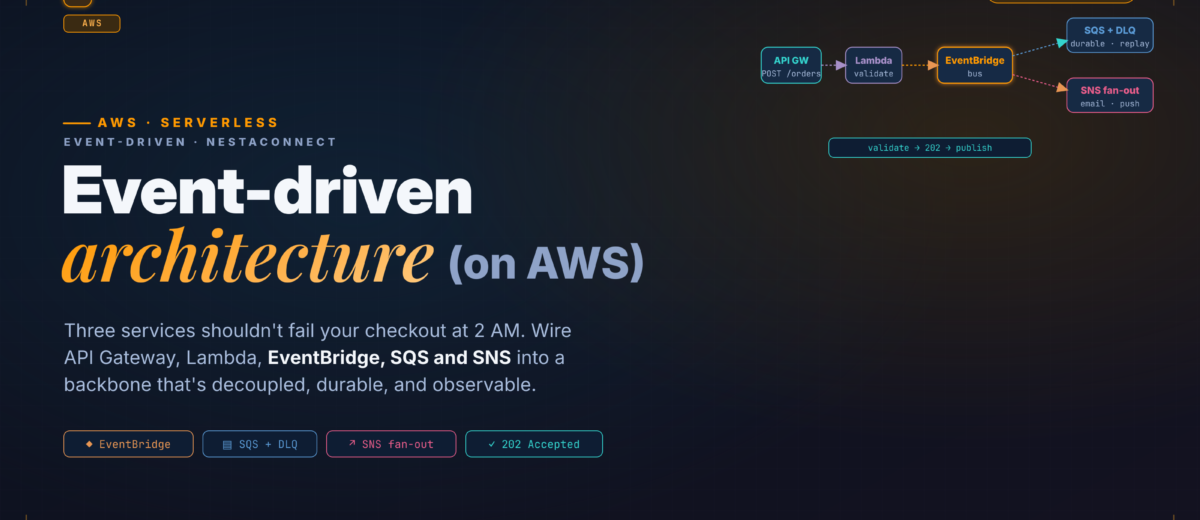
Three services shouldn’t be able to fail your checkout at 2 AM. This is how you wire API Gateway, Lambda, EventBridge, SQS and SNS into an event backbone that’s genuinely decoupled, durable, and observable — with configuration verified against the AWS docs.
You have three services that react to a new order: inventory decrements stock, notifications send a confirmation, analytics records the event. The first pass calls all three synchronously from the order API — and it works until the notification service dies overnight, the whole checkout fails with it, and someone gets paged. The naive patch (try/catch and swallow failures on the “non-critical” paths) trades a visible outage for silent data loss. What you actually want is a durable, loosely coupled event backbone, and AWS gives you the primitives to build one correctly — if you understand how they compose.
01 · Know the Primitives — Before You Compose Them
Get the mental model right before writing any infrastructure. Each service solves one problem:
| Service | What it does | Use it for |
|---|---|---|
| API Gateway | HTTP/WebSocket front door | Synchronous client-facing APIs |
| Lambda | Stateless compute | Handlers, transforms, business logic |
| EventBridge | Event bus with routing rules | Content routing, fan-out, scheduling |
| SQS | Durable queue | Buffering, load-levelling, retry isolation |
| SNS | Pub/sub topic | One-to-many fan-out to mixed subscribers |
The common mistake is treating these as interchangeable. EventBridge and SNS both fan out, but EventBridge routes by event content using rules, while SNS delivers to all subscribers and filters per subscription (on attributes or the message body — more on that below). SQS is different again: it’s a durable queue that stores messages until they’re processed, with per-message visibility, per-queue dead-lettering, and backpressure. EventBridge routes in near-real-time but doesn’t buffer — so when you need durable buffering and retry isolation, SQS is the tool.
02 · The Target Architecture
- API Gateway receives
POST /orders. - An order Lambda validates and enriches the payload, then publishes to EventBridge.
- EventBridge routes the event to two targets — an SQS queue for inventory, an SNS topic for notifications.
- The inventory Lambda reads from SQS, with a DLQ catching exhausted retries.
- The notification Lambda is subscribed to SNS.
03 · Define the Event Schema First
Most integration bugs are schema drift. Fix the contract before writing handlers. A sample event:
{
  "source": "ecommerce.orders",
  "detail-type": "OrderPlaced",
  "detail": {
    "orderId": "ord-7f3a9b",
    "customerId": "cust-112",
    "items": [ { "sku": "PROD-001", "quantity": 2, "unitPrice": 29.99 } ],
    "totalAmount": 59.98,
    "currency": "USD",
    "placedAt": "2026-03-15T14:22:00Z"
  }
}
Register it in the EventBridge Schema Registry, which accepts both OpenAPI 3 and JSONSchema Draft4 — AWS recommends the JSONSchema format when you want client-side validation. The registry doubles as living documentation and generates code bindings for your handlers.
aws schemas create-schema \
  --registry-name ecommerce-events \
  --schema-name OrderPlaced \
  --type JSONSchemaDraft4 \
  --content file://order-placed-schema.json
04 · API Gateway → Lambda — The Front Door
Create a REST API with POST /orders using the AWS_PROXY integration so Lambda gets the full request context. The order Lambda does exactly two things: validate and publish. No business logic here.
import json, uuid, boto3
from datetime import datetime, timezone

events_client = boto3.client('events')

def handler(event, context):
    try:
        body = json.loads(event['body'])
    except (json.JSONDecodeError, KeyError):
        return {'statusCode': 400, 'body': json.dumps({'error': 'Invalid request body'})}

    missing = [f for f in ['customerId', 'items'] if f not in body]
    if missing:
        return {'statusCode': 422, 'body': json.dumps({'error': f'Missing: {missing}'})}

    order_id = f"ord-{uuid.uuid4().hex[:8]}"
    total = sum(i['quantity'] * i['unitPrice'] for i in body['items'])

    detail = {
        'orderId': order_id, 'customerId': body['customerId'],
        'items': body['items'], 'totalAmount': round(total, 2),
        'currency': body.get('currency', 'USD'),
        'placedAt': datetime.now(timezone.utc).isoformat()
    }

    resp = events_client.put_events(Entries=[{
        'Source': 'ecommerce.orders', 'DetailType': 'OrderPlaced',
        'Detail': json.dumps(detail), 'EventBusName': 'ecommerce-bus'
    }])

    # A non-zero FailedEntryCount means the event was NOT ingested
    if resp['FailedEntryCount'] > 0:
        print(f"put_events failed: {resp['Entries']}")
        return {'statusCode': 500, 'body': json.dumps({'error': 'Publish failed'})}

return {'statusCode': 202, 'body': json.dumps({'orderId': order_id, 'status': 'accepted'})}Return 202 Accepted: the order has been accepted for processing, not completed. It sets the right expectation for consumers that downstream work is asynchronous. And because this Lambda only publishes, a failed put_events yields a clean 500 with nothing partially committed — it never calls inventory or notifications directly.
05 · EventBridge Routing Rules
Create a custom bus and rules that match the event and forward it to each target.
Resources:
  EcommerceBus:
    Type: AWS::Events::EventBus
    Properties: { Name: ecommerce-bus }

  InventoryRule:
    Type: AWS::Events::Rule
    Properties:
      EventBusName: !Ref EcommerceBus
      EventPattern:
        source: [ "ecommerce.orders" ]
        detail-type: [ "OrderPlaced" ]
      Targets:
        - Id: InventoryQueue
          Arn: !GetAtt InventoryQueue.Arn

  NotificationRule:
    Type: AWS::Events::Rule
    Properties:
      EventBusName: !Ref EcommerceBus
      EventPattern:
        source: [ "ecommerce.orders" ]
        detail-type: [ "OrderPlaced" ]
      Targets:
        - Id: NotificationTopic
          Arn: !Ref NotificationTopic
You can add content-based filtering in the rule without touching any handler — for example, only route high-value orders to a fraud-check queue:
{
  "source": ["ecommerce.orders"],
  "detail-type": ["OrderPlaced"],
  "detail": { "totalAmount": [{ "numeric": [">", 500] }] }
}
This is where EventBridge earns its place over a bare SNS topic: routing logic lives in the bus, not scattered across consumers.
06 · SQS + Dead-Letter Queue — Durable Inventory
  InventoryQueue:
    Type: AWS::SQS::Queue
    Properties:
      QueueName: inventory-processing
      VisibilityTimeout: 180          # ≥ 6× Lambda timeout (+ batch window)
      RedrivePolicy:
        deadLetterTargetArn: !GetAtt InventoryDLQ.Arn
        maxReceiveCount: 5            # AWS recommends at least 5

  InventoryDLQ:
    Type: AWS::SQS::Queue
    Properties:
      QueueName: inventory-processing-dlq
      MessageRetentionPeriod: 1209600 # 14 days
Two settings people get wrong. Visibility timeout: AWS recommends at least six times your function timeout plus the batching window — and the function timeout must be no greater than the queue’s visibility timeout (Lambda enforces this on the event source mapping). Mismatched timeouts are a top cause of duplicate processing. maxReceiveCount: AWS recommends at least 5, giving Lambda a few retries before a message is redriven to the DLQ.
def handler(event, context):
    batch_item_failures = []
    for record in event['Records']:
        try:
            body = json.loads(record['body'])
            # EventBridge delivers the full event; 'detail' is the payload
            detail = body.get('detail', body)
            process_inventory(detail)
        except Exception as e:
            print(f"Failed {record['messageId']}: {e}")
            batch_item_failures.append({'itemIdentifier': record['messageId']})
    return {'batchItemFailures': batch_item_failures}
Enable ReportBatchItemFailures in the event source mapping’s FunctionResponseTypes. Without it, one failed message in a batch of ten returns all ten to the queue — reprocessing the nine that succeeded. With it, only the failed IDs go back.
07 · SNS — Fan-Out for Notifications
The notification topic fans out to several subscribers — an email Lambda, a push Lambda, maybe an SQS queue for SMS batching. The notification Lambda pulls the original event out of the SNS envelope:
def handler(event, context):
    for record in event['Records']:
        sns_message = json.loads(record['Sns']['Message'])
        detail = sns_message.get('detail', {})
        send_confirmation_email(
            customer_id=detail['customerId'],
            order_id=detail['orderId'],
            total=detail['totalAmount']
)To send only a subset of messages to a subscriber, use an SNS subscription filter policy. Older guidance says filtering works on message attributes only — that’s out of date. SNS supports payload-based filtering: set the subscription’s FilterPolicyScope to MessageBody and filter directly on the event EventBridge delivers, no attributes required. (The default scope is MessageAttributes.)
  PushSubscription:
    Type: AWS::SNS::Subscription
    Properties:
      Protocol: lambda
      TopicArn: !Ref NotificationTopic
      Endpoint: !GetAtt PushLambda.Arn
      FilterPolicyScope: MessageBody
      FilterPolicy:
        detail:
          customerType: [ "mobile" ]
Only events whose detail.customerType is "mobile" reach the push Lambda; the email subscription (no filter) still gets everything. If you’d rather keep all routing in one place, split subsets with EventBridge rules into separate topics instead.
08 · Observability — Not Optional
This pattern is distributed; debugging it without tracing and structured logs is misery. Enable X-Ray on API Gateway, every Lambda, and SQS, and log a consistent JSON shape everywhere:
import json, logging
logger = logging.getLogger(); logger.setLevel(logging.INFO)

def log_event(action, order_id, **kwargs):
    logger.info(json.dumps({'action': action, 'orderId': order_id, **kwargs}))
Put these on a CloudWatch dashboard, at minimum:
AWS/Events→FailedInvocationsper ruleAWS/SQS→ApproximateNumberOfMessagesVisibleon the queue and DLQ depthAWS/Lambda→ErrorsandDurationper functionAWS/ApiGateway→5XXErrorandLatency
Alarm on DLQ depth. Any message in the DLQ is a failure that exhausted its retries — you want to hear about it immediately, not at a weekly review.
09 · Pitfalls & How to Avoid Them
- Target permissions are a silent failure. EventBridge needs permission to deliver to each target — an SQS queue policy allowing the rule to
SendMessage, an SNS topic policy allowingPublish. Miss it and the event is accepted, the rule matches, but nothing arrives. Test with sample events and watch the rule’sFailedInvocations. (The inventory Lambda also needs SQS read permissions — the managedAWSLambdaSQSQueueExecutionRolecovers them.) - Lambda scales hard off SQS. Standard queues start at five concurrent batches and add up to 300 invocations/minute (to a max of 1,250). If your database pool tops out at 50 connections, a burst exhausts it. Cap it with
MaximumConcurrencyon the event source mapping (ScalingConfig, 2–1000) — and set the function’s reserved concurrency higher than that max so it isn’t throttled. AWS recommends the max-concurrency setting over reserved concurrency for limiting per-source throughput. - 256 KB event ceiling. An EventBridge
PutEventsentry maxes at 256 KB. For large payloads (full product data, binaries), store the object in S3 and put only a reference in the event — the claim-check pattern. It applies to SQS just the same. - SQS is at-least-once. The same message can arrive twice — e.g. processed successfully but deleted after the visibility timeout lapsed. Make writes idempotent: a DynamoDB conditional write keyed on
orderIdis the clean way.
10 · FAQ
When should I use EventBridge instead of SNS for fan-out?
Use EventBridge when you want content-based routing rules living in the bus, so new consumers are added without changing publisher code. SNS suits straightforward one-to-many fan-out and can filter per subscription on attributes or the message body.
How do I stop SQS from processing a message twice?
SQS is at-least-once, so make processing idempotent (e.g. a DynamoDB conditional write on the order ID). Also set visibility timeout to at least six times the Lambda timeout so a slow invocation isn’t reprocessed.
Can SNS filter on the message body?
Yes — set the subscription’s FilterPolicyScope to MessageBody to filter on the payload, or leave the default MessageAttributes to filter on attributes.
11 · Recap
Validate, then 202
API Gateway → a publish-only Lambda that returns 202 Accepted. Nothing partially commits.
- Schema-first contract
- Check FailedEntryCount
EventBridge in the middle
Content-based rules route to SQS and SNS. Add consumers without touching publishers.
- Numeric / pattern filters
- 256 KB entry cap
Durable & observed
SQS + DLQ (maxReceiveCount 5), partial-batch failures, SNS body filtering, DLQ alarms.
- Idempotent writes
- Cap concurrency per source